# Introduction

Crypto can be overwhelming. It’s loud, fast-moving, and full of hype, scams, and endless noise. It’s hard to know who or what to trust, let alone where to focus your energy. That’s why we created Alphagate.

We’re here to make your crypto journey clearer, simpler, and safer. No more chasing unreliable tips or scrolling for hours trying to figure out what’s legit. Alphagate cuts through the noise and shows you what actually matters—so you can stay informed, avoid scams, and make smarter decisions.

Think of us as your guide in this crazy space. We help you spot opportunities before they blow up and avoid the traps that could cost you. Instead of getting lost in the chaos, you’ll have the confidence to move with purpose and focus on what’s worth your time.

## Quick links

{% content-ref url="/pages/2HOZvLiZMEIMBr7pk0Oi" %}
[Our Features](/overview/our-features)
{% endcontent-ref %}

## Get Started

{% content-ref url="/pages/0YAiR80rcb69SGoZGCnX" %}
[Discover](/features/discover)
{% endcontent-ref %}

{% content-ref url="/pages/lPbpvPUc6wfrct0mRxHz" %}
[Followings](/features/followings)
{% endcontent-ref %}

{% content-ref url="/pages/iayIpCP81KbfV1DuKcpb" %}
[Telegram Bot](/features/telegram-bot)
{% endcontent-ref %}


# Our Features

[**Extension**](/features/extension)\
With the extension, exploring Crypto Twitter has never been easier. Alphagate lets you quickly check profile details, track username changes, and spot key followers effortlessly. You can also monitor all contracts a project has posted, even if they’ve been deleted, and easily identify accounts with multiple renames. Want to discover something new or trending? Just click the popup and dive in.

[**Discover**](/features/discover)\
Easily uncover projects that match your interests. With real-time search and customizable filters, you can quickly find the most relevant opportunities without wasting time on irrelevant results.

[**Followings**](/features/followings)\
Stay ahead by monitoring the followings of over 7300 key Crypto Twitter profiles. This feature helps you identify emerging trends, spot new opportunities, and gain valuable insights into what top influencers and key players are paying attention to.

[**Project**](/features/project)\
Gain a complete understanding of any project at a glance. Alphagate’s project pages provide Twitter activity, categories, key followers, social links, and alert options. The analytics section gives you actionable growth data, while the Latest Followers feature ensures you don’t miss connections with high-potential profiles.

[**KeyProfile**](/features/keyprofile)

Effortlessly track the activity of key profiles that matter to you. Each profile page lets you see their latest follows, organize them with tags, and add them to your watchlist for instant updates. This helps you stay informed about who they’re engaging with and what might be worth your attention.

[**Trending**](/features/trending)\
Quickly identify what’s hot right now. The Trending feature provides insights into Twitter activity and project growth over various timeframes—1 day, 7 days, 15 days, or 30 days—so you can spot rising stars and evolving interests in the crypto space.

[**Feed**](/features/feed)\
Stay informed in real-time with the Alphagate Feed. Get instant alerts on account changes, live tweets from watched projects, recent notes from your activity, and more. It’s your all-in-one dashboard to stay on top of fast-moving developments.

[**Watchlist**](/features/watchlist)\
Never lose track of the projects or profiles you care about. Alphagate’s Watchlist allows you to organize and monitor your favorites, track follower growth in real-time, and receive custom alerts for any updates—helping you act quickly and stay ahead.

[**Telegram Bot**](/features/telegram-bot)\
Get updates and insights wherever you are by connecting Alphagate to Telegram. Access Discover, Followings, and private chats directly through the app. Receive instant notifications and use simple commands to gather key information and stay engaged on the go.

[**Chat**](/features/chat)\
Collaborate and share insights with others through Alphagate’s Chat feature. Each project has its own dedicated chat room, making it easy to communicate, exchange ideas, and build knowledge with the community.


# Official Links

Website: <https://alphagate.io/>

Extension: [https://alphagate.io/extension](https://chromewebstore.google.com/detail/alphagate-x/niokainjnclnhaflagpmeobbnklokill?hl=en)

Twitter: <https://twitter.com/alphagate_io>

Discord: <https://discord.gg/alphagate>

Telegram: <https://t.me/alphatelegrambot>


# Extension

With the extension, exploring Crypto Twitter has never been easier. Alphagate lets you quickly check profile details, track username changes, and spot key followers effortlessly. You can also monitor all contracts a project has posted, even if they’ve been deleted, and easily identify accounts with multiple renames. Want to discover something new or trending? Just click the popup and dive in.<br>

**Versions**

You can download the **Chrome** extension[ **here**](https://chromewebstore.google.com/detail/alphagate-x/niokainjnclnhaflagpmeobbnklokill?hl=en)

For a local installation download the zip and import the unzipped folder through `chrome://extensions/`&#x20;

{% file src="/files/cXpY03WK69Hcfr3v6Pnw" %}
Uploaded on January 27 2026 (Axiom fix)
{% endfile %}

{% file src="/files/QzTIL8MEQK2A48BKXs82" %}
Uploaded on March 16 2025 (Photon-Bullx version)
{% endfile %}

Old version with Twitter only support and no Photon-Bullx-Axiom integration.

{% file src="/files/EFg6YXNBUXna5TcrhPiY" %}
Uploaded on February 6 2025<br>
{% endfile %}

For a local **Firefox** installation download the zip, navigate to&#x20;

`about:debugging#/runtime/this-firefox`

click Load Temporary Add-on and import the manifest.json file

{% file src="/files/2qHla4YcmWlxHzJXmkEQ" %}
Uploaded on August 5 2025
{% endfile %}

**Projects**

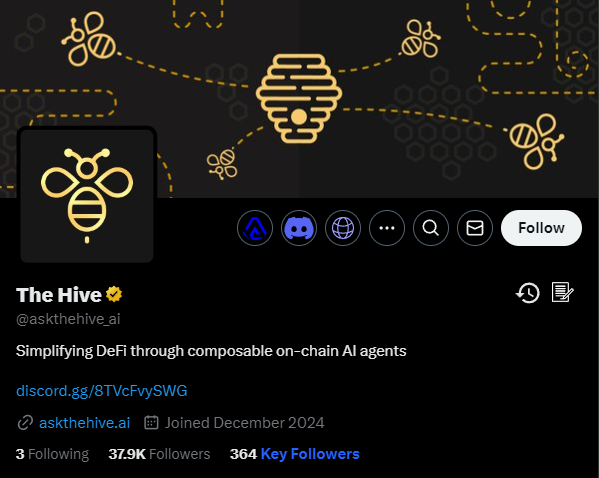
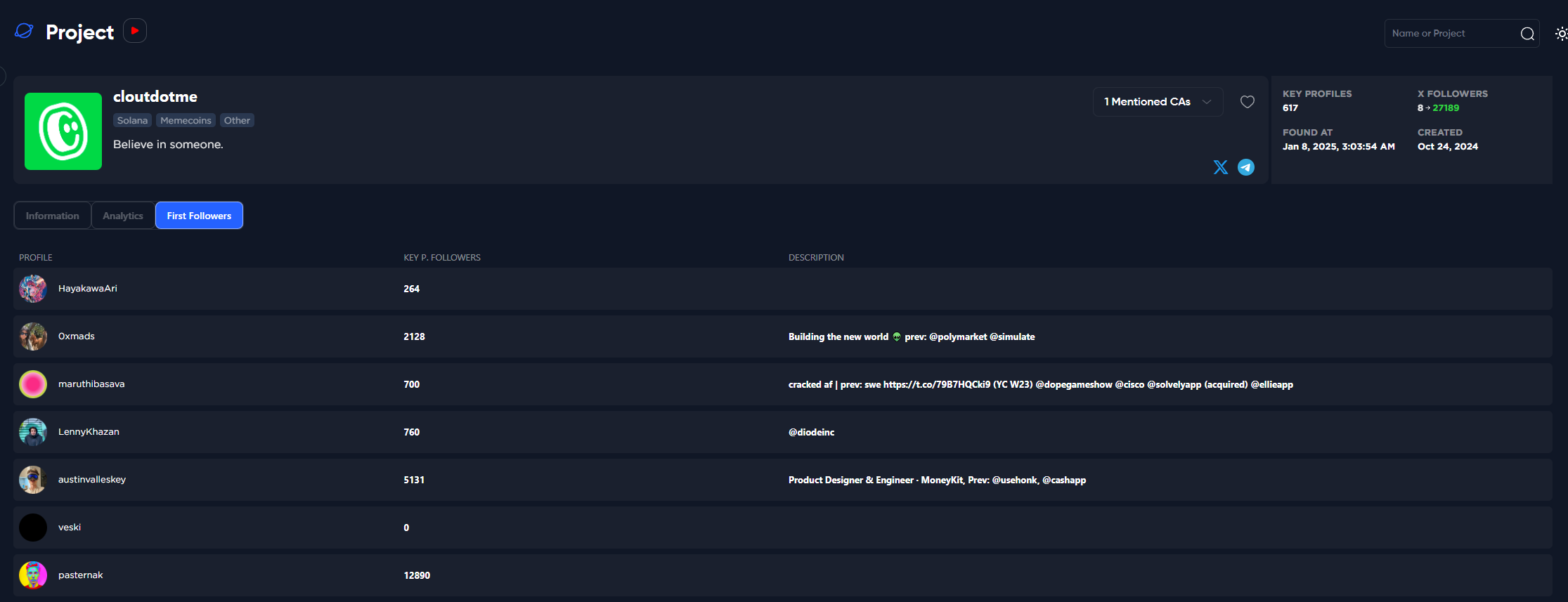
<figure><img src="https://3883845459-files.gitbook.io/~/files/v0/b/gitbook-x-prod.appspot.com/o/spaces%2FkYOwxgjAF3N544ot4Zcf%2Fuploads%2FopvbDK2mqPNBZbNvRA4T%2Fimage.png?alt=media&amp;token=e2080f89-9adf-4c8d-b65c-c1840a01b78d" alt=""><figcaption><p>Project info</p></figcaption></figure>

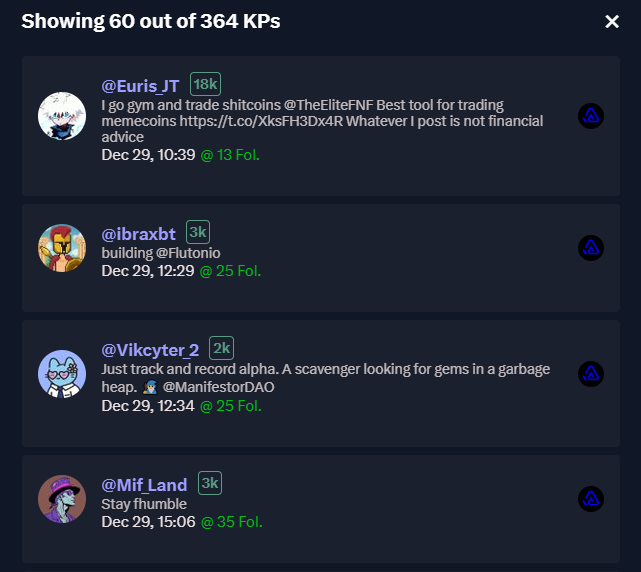
By clicking on "Key Followers" you can see a list of the key profiles that followed the project early on.&#x20;

<figure><img src="https://3883845459-files.gitbook.io/~/files/v0/b/gitbook-x-prod.appspot.com/o/spaces%2FkYOwxgjAF3N544ot4Zcf%2Fuploads%2FJw1fog3TdzfmnxLA1pq2%2Fimage.png?alt=media&amp;token=1b65f1c9-b6b7-451e-b4ff-0bed256fd0a3" alt=""><figcaption><p><strong>Key Followers from old > new</strong></p></figcaption></figure>

By clicking on the <img src="https://3883845459-files.gitbook.io/~/files/v0/b/gitbook-x-prod.appspot.com/o/spaces%2FkYOwxgjAF3N544ot4Zcf%2Fuploads%2F7H53MuSygPtU3e7MEBzW%2Fimage.png?alt=media&amp;token=f61420b9-93ef-431a-a3f0-d22a3a71a3c3" alt="" data-size="line"> icon, you can view a list of the latest alerts.
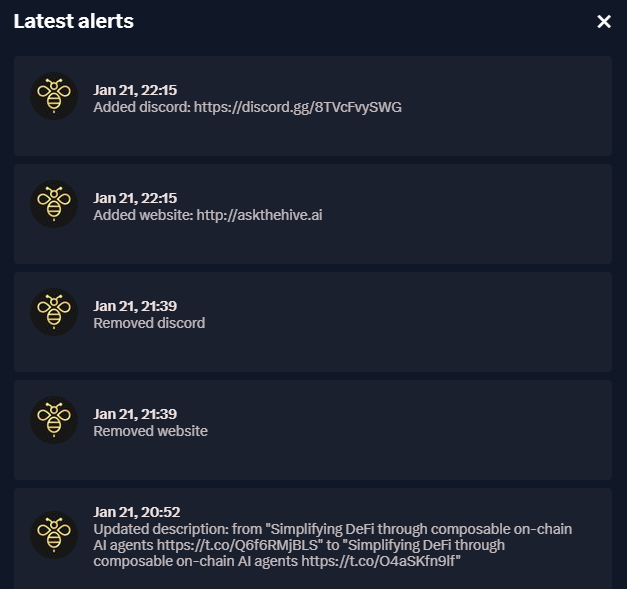
<figure><img src="https://3883845459-files.gitbook.io/~/files/v0/b/gitbook-x-prod.appspot.com/o/spaces%2FkYOwxgjAF3N544ot4Zcf%2Fuploads%2FnrNMwHfiyTBdUk43hEKq%2Fimage.png?alt=media&amp;token=9dba4e98-693c-4c11-8cf2-b41ff2dc2fe3" alt=""><figcaption><p>Project's latest bio - link changes</p></figcaption></figure>

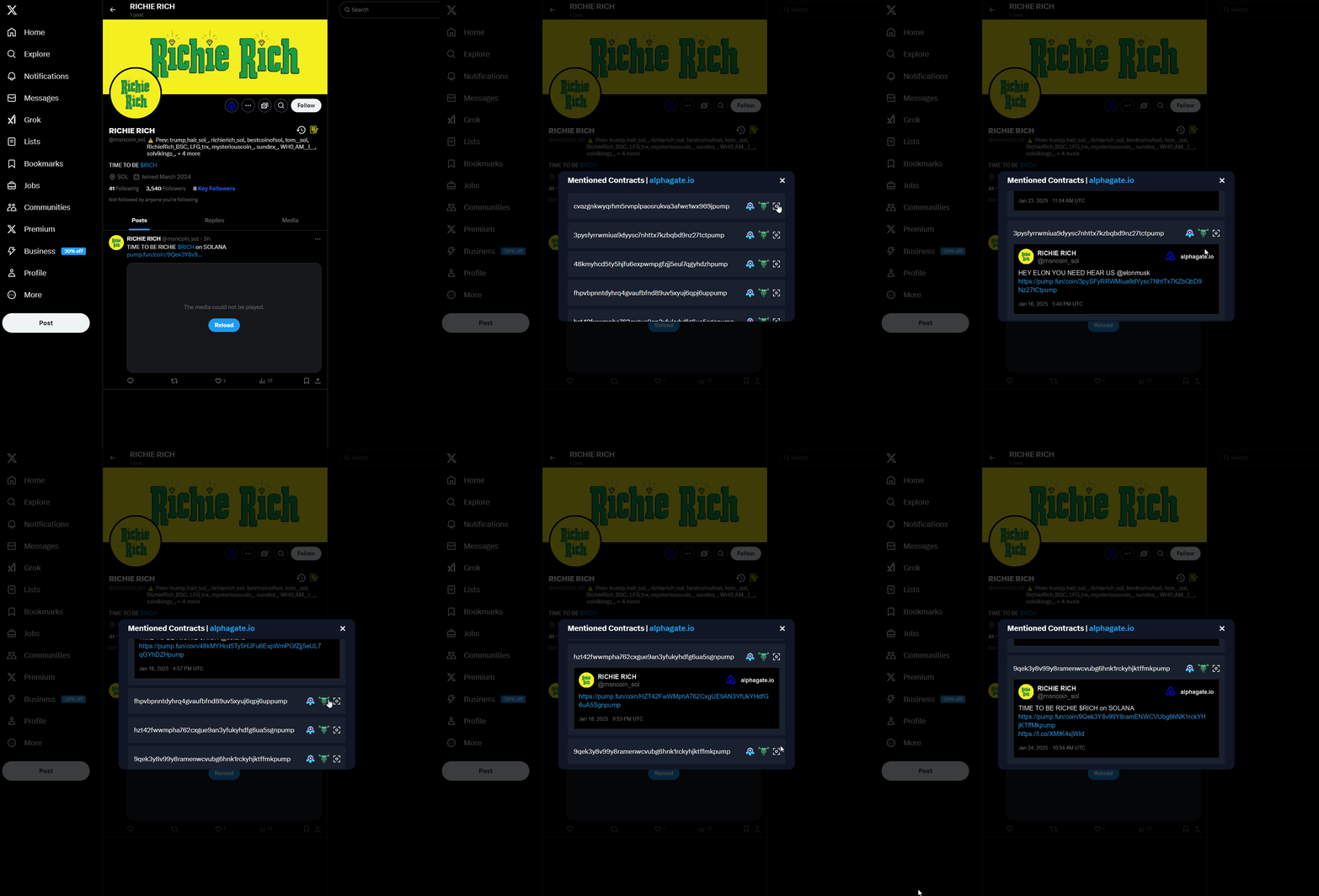
By clicking on the <img src="https://3883845459-files.gitbook.io/~/files/v0/b/gitbook-x-prod.appspot.com/o/spaces%2FkYOwxgjAF3N544ot4Zcf%2Fuploads%2FRsekR9xURvVCTEUQKRX4%2Fimage.png?alt=media&amp;token=f14defc1-758f-44e3-811f-efc891ab741e" alt="" data-size="line"> icon, you can view a list of all the contracts posted by the project.
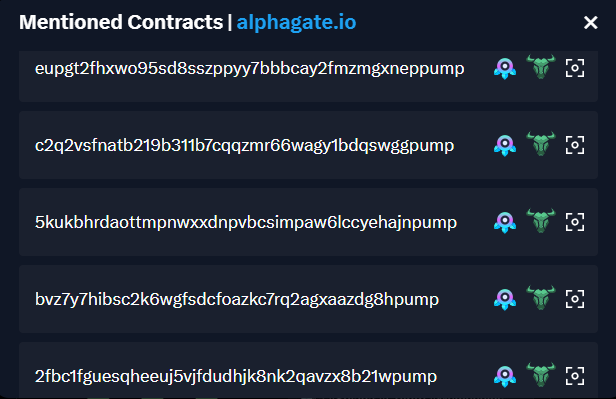
<figure><img src="https://3883845459-files.gitbook.io/~/files/v0/b/gitbook-x-prod.appspot.com/o/spaces%2FkYOwxgjAF3N544ot4Zcf%2Fuploads%2FHNg0XddMldyMfzj12auH%2Fimage.png?alt=media&amp;token=303759dd-fe52-471b-8026-f5437b8a7846" alt=""><figcaption><p>List of contracts</p></figcaption></figure>

## Renamed Accounts and Previous Contracts

When you're browsing X and come across a project with renamed data in our records, we'll automatically display it without requiring any additional clicks from you. This helps filter out rug pulls.

<figure><img src="https://3883845459-files.gitbook.io/~/files/v0/b/gitbook-x-prod.appspot.com/o/spaces%2FkYOwxgjAF3N544ot4Zcf%2Fuploads%2FLEj6L12RSVLpRhiJeJdp%2Fimage.png?alt=media&amp;token=b866654b-e972-4c7b-a0f2-852c9b2fd3e8" alt=""><figcaption></figcaption></figure>

We also track all the contracts ever posted by that profile, even if they are deleted later.

<figure><img src="https://3883845459-files.gitbook.io/~/files/v0/b/gitbook-x-prod.appspot.com/o/spaces%2FkYOwxgjAF3N544ot4Zcf%2Fuploads%2FkG3aEClqxK4kGmAr78dp%2Fchrome_mesoVTVMBK.gif?alt=media&amp;token=9e146b27-8baf-4322-aa8e-ac1deee7df48" alt=""><figcaption></figcaption></figure>

{% hint style="info" %}
For example, the account launched two contracts in the past, and the tweets were deleted afterwards. That, combined with several renames, indicates it’s probably a serial scammer.
{% endhint %}

## Key Profiles

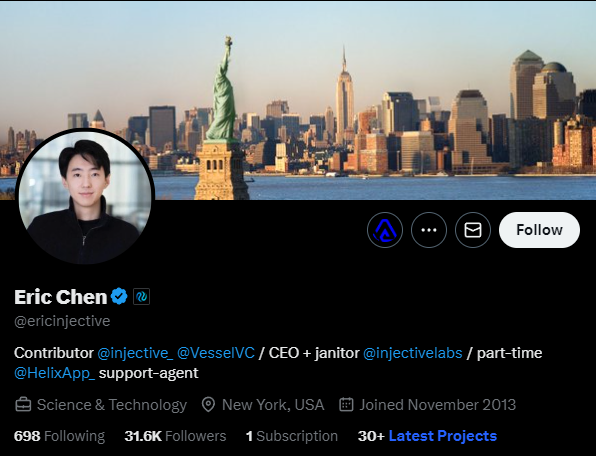
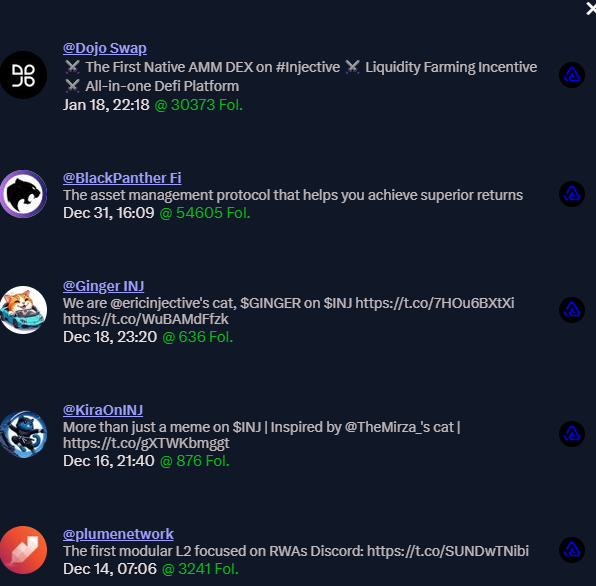
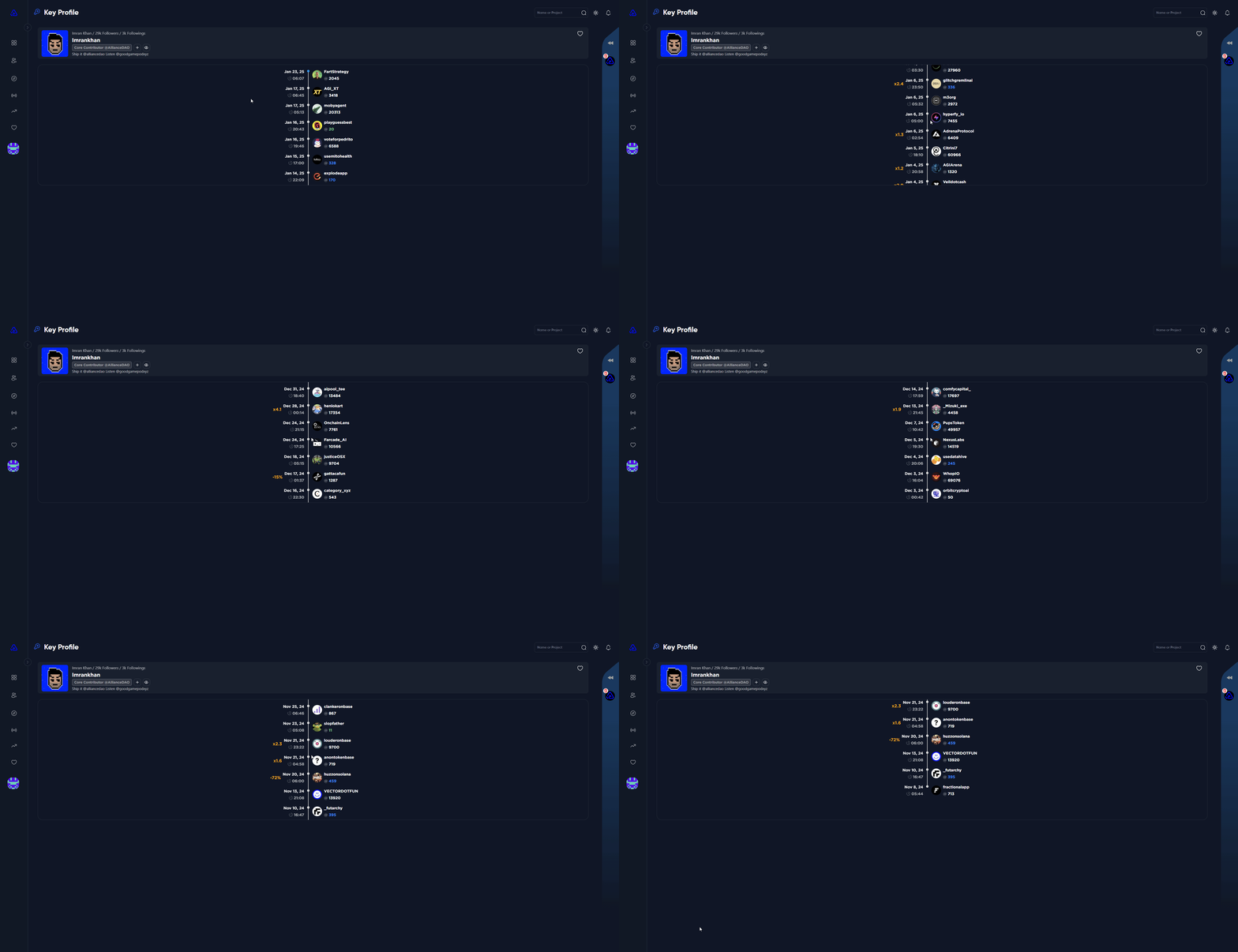
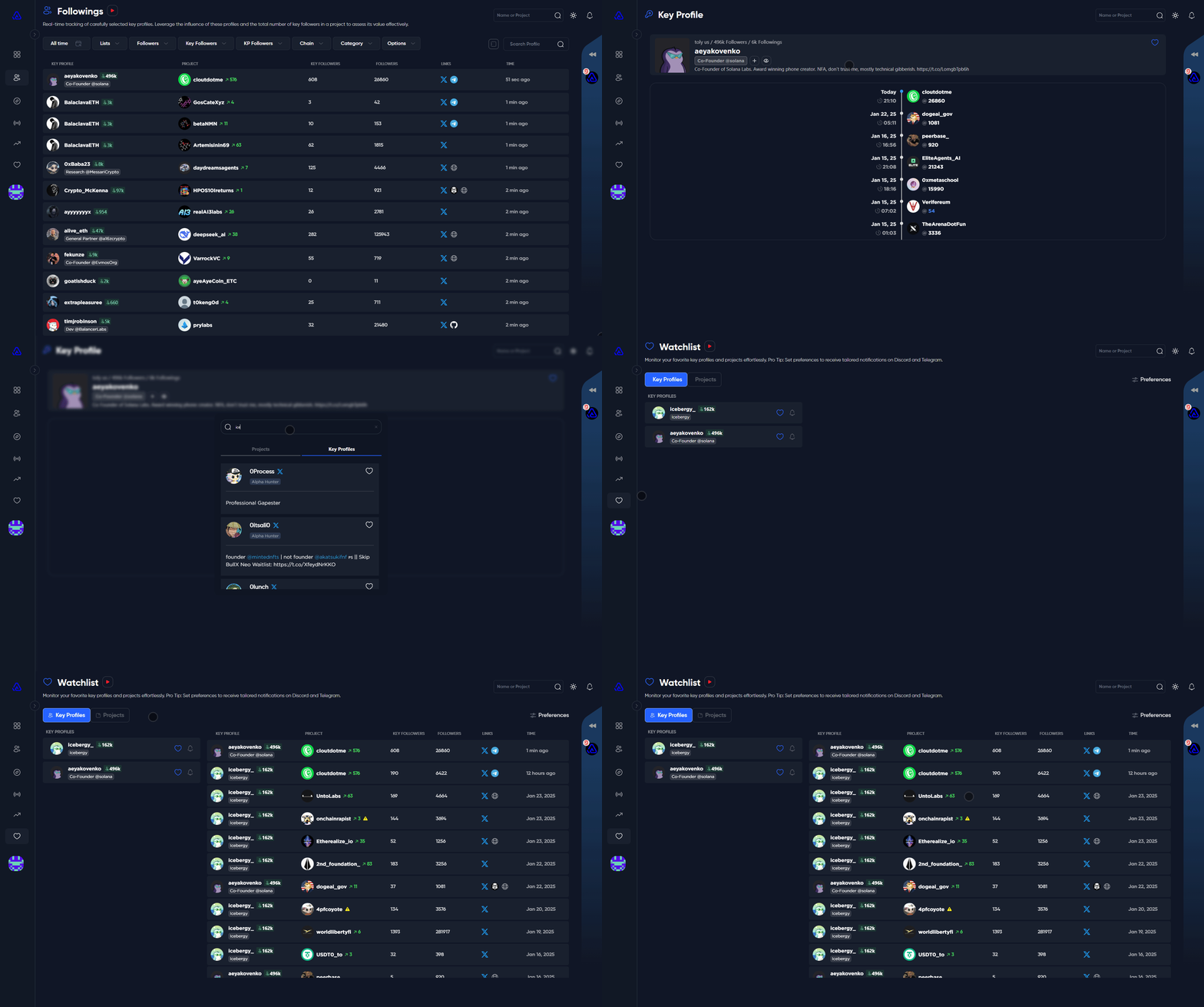
When visiting a key profile that we have in our database you can view records of their latest follows, let's take a look at Injective's CEO profile as an example.

<figure><img src="https://3883845459-files.gitbook.io/~/files/v0/b/gitbook-x-prod.appspot.com/o/spaces%2FkYOwxgjAF3N544ot4Zcf%2Fuploads%2FsDdu1UzgPUfGxWPGLI1T%2Fopera_D59BWHGP87.png?alt=media&amp;token=f3b33a24-5ce9-498a-b0c5-9af6168bbc36" alt=""><figcaption></figcaption></figure>

<figure><img src="https://3883845459-files.gitbook.io/~/files/v0/b/gitbook-x-prod.appspot.com/o/spaces%2FkYOwxgjAF3N544ot4Zcf%2Fuploads%2Fy8p7a6F1h72RP7XxreGA%2Fopera_3nK0aj39kr.png?alt=media&amp;token=01772b5e-3f67-4857-b03d-0e8ecd6f9a5b" alt=""><figcaption></figcaption></figure>

## Popup

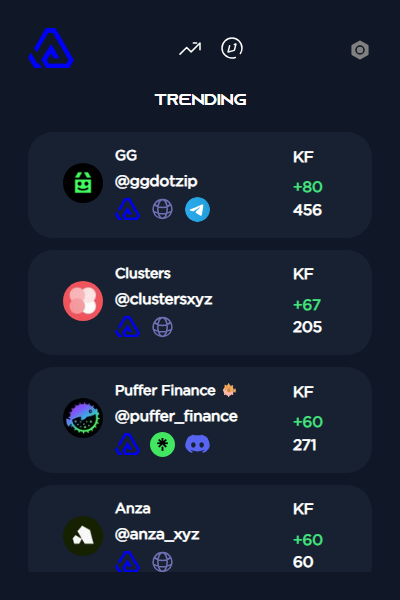
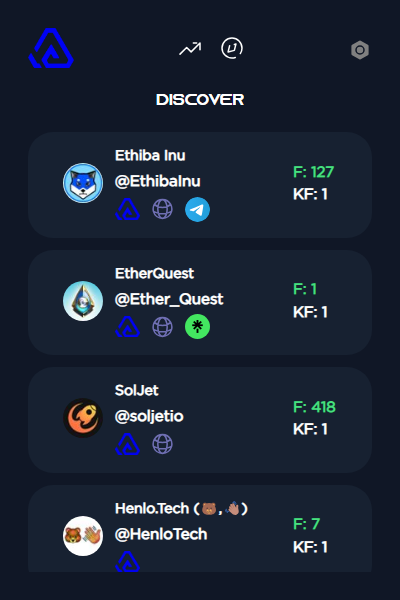
The popup has two sections at the time of writing.

* Trending Projects (Displays the recent Trending projects)
* Discover Feed (Displays the latest projects that Alphagate captures in real time.)

<figure><img src="https://3883845459-files.gitbook.io/~/files/v0/b/gitbook-x-prod.appspot.com/o/spaces%2FkYOwxgjAF3N544ot4Zcf%2Fuploads%2FOHckrVMEuDmqPOiaJBJI%2FsLkNMk9ie8.png?alt=media&amp;token=62b20f2e-44c7-4260-8c1d-9b5db9bc4057" alt=""><figcaption></figcaption></figure>

<figure><img src="https://3883845459-files.gitbook.io/~/files/v0/b/gitbook-x-prod.appspot.com/o/spaces%2FkYOwxgjAF3N544ot4Zcf%2Fuploads%2FXtgqiOtlKFE9friRKCwJ%2FCJlJsuJm43.png?alt=media&amp;token=8cffe7e9-516d-4c33-a8a7-1f3da6c2408f" alt=""><figcaption></figcaption></figure>


# Sidepanel

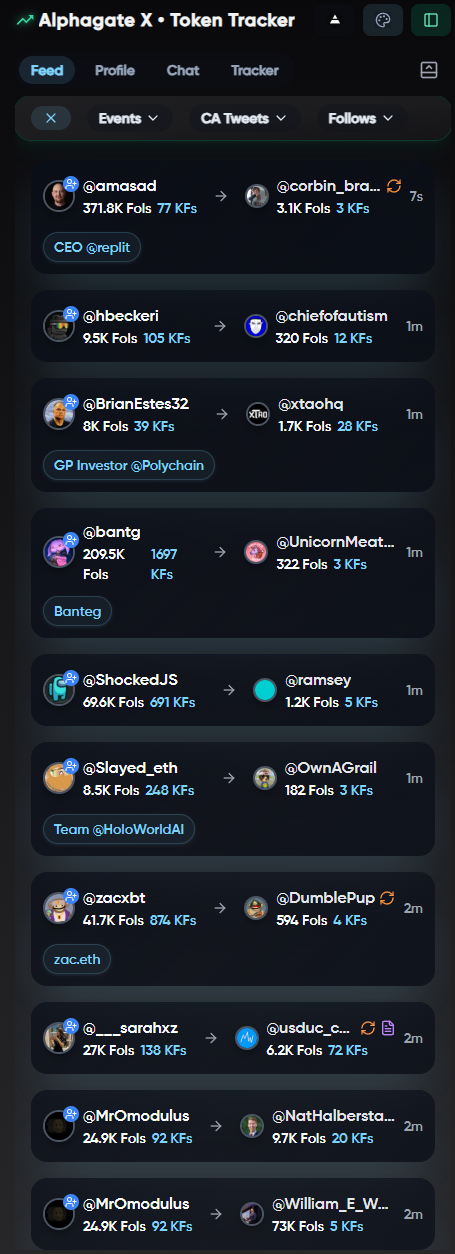
**Feed:** A global stream of CA tweets, follows, and key events across 150K+ tracked accounts — fully filterable, with more sources and features coming soon.

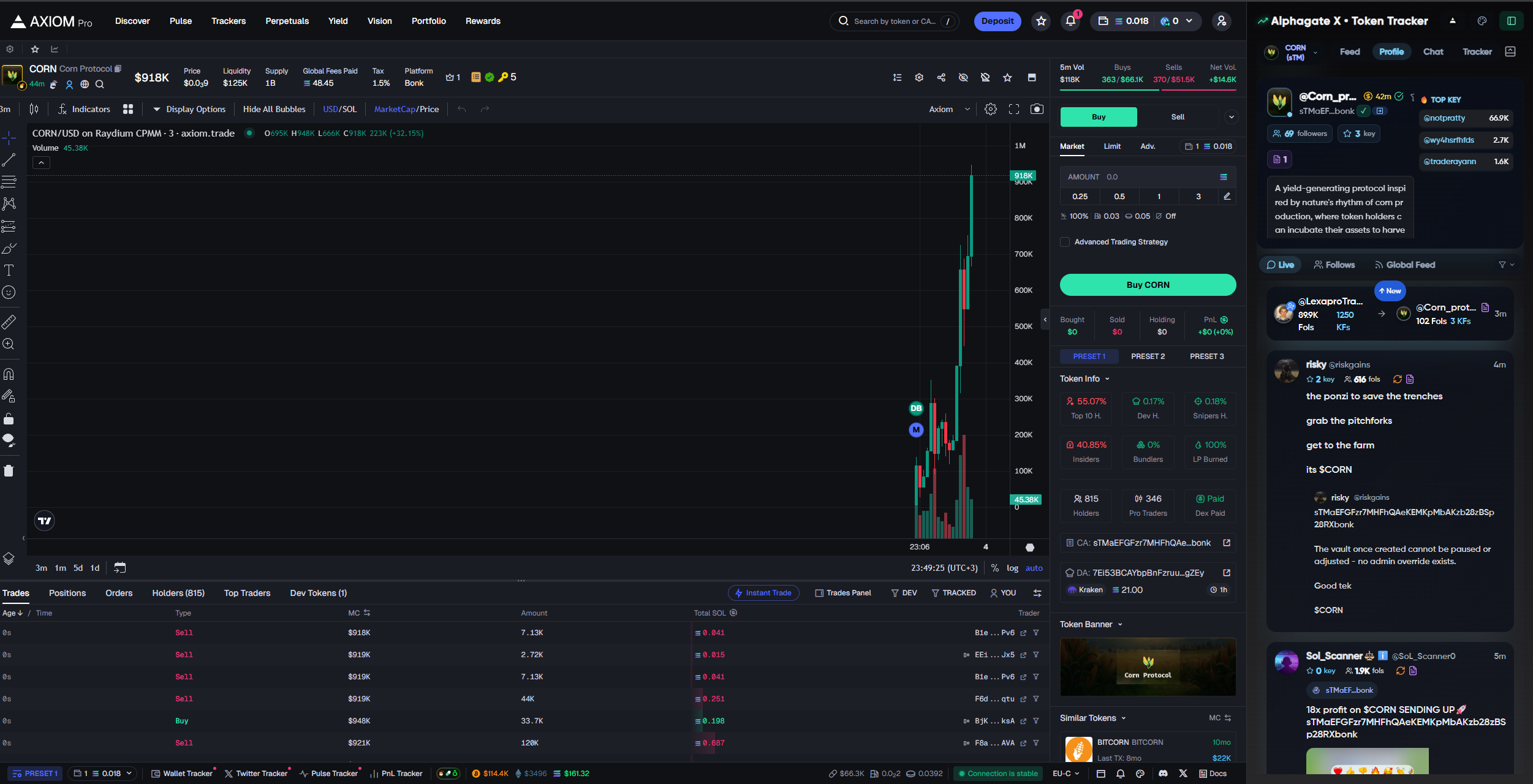
**Profile:** Open a token on a supported trading terminal and the sidepanel auto-activates, streaming real-time tweets, mentions, and alerts from any account referencing the token’s contract address, $ticker, or official @handle — so you never have to open X while trading.

The sidepanel can be spawned with 1 click (default position: right, toggleable left/right).&#x20;

It stays open and live until manually closed.

{% columns %}
{% column %}

<div align="left"><figure><img src="https://3883845459-files.gitbook.io/~/files/v0/b/gitbook-x-prod.appspot.com/o/spaces%2FkYOwxgjAF3N544ot4Zcf%2Fuploads%2FzexvWf9yIccIqDKnO1NW%2Fimage.png?alt=media&amp;token=3a5913cf-d8f2-46ab-959d-51b1b1181d82" alt="" width="275"><figcaption></figcaption></figure></div>
{% endcolumn %}

{% column %}

<div align="left"><figure><img src="https://3883845459-files.gitbook.io/~/files/v0/b/gitbook-x-prod.appspot.com/o/spaces%2FkYOwxgjAF3N544ot4Zcf%2Fuploads%2F00FqlBu2Rl5AUG221LS0%2Fimage.png?alt=media&amp;token=f7f4da5a-d051-475b-8a1c-aee92de17d04" alt="Preview 2" width="299"><figcaption></figcaption></figure></div>

{% endcolumn %}
{% endcolumns %}

{% columns %}
{% column width="50%" %}

{% endcolumn %}

{% column %}

{% endcolumn %}
{% endcolumns %}

## Feed

Once opened, the panel shows a global feed of:

* **Follows**
* **CA Tweets**
* **DEX Paid alerts**&#x20;

More events are coming soon. You can enable/disable each one as needed.

## CA Tweets

CA tweets are sourced from over **150K monitored accounts**. \
You can use these filters:\
\
`Min Followers`\
`Min Key Followers`\
`Max Renames`\
`Max Contracts`\
`Hide/Show Replies`\
`Hide/Show Retweets`

We track everything from AI builders to devs, founders, and niche projects. If someone drops a stealth launch **and it matches your filters**, you’ll catch it within 5 seconds. Discord webhook and Telegram integrations are coming soon.

## Follows

Follow alerts are pulled from our curated database of 9,000+ key profiles (and growing). \
You can use these filters:

Key Profile\
`Min Followers`

Target Profile\
`Min Followers`\
`Max Followers`\
`Max-Key Followers`\
`Max Renames`\
`Max Contracts`

<div align="left"><figure><img src="https://3883845459-files.gitbook.io/~/files/v0/b/gitbook-x-prod.appspot.com/o/spaces%2FkYOwxgjAF3N544ot4Zcf%2Fuploads%2F3eU5ZmEJNElzfSD1laW8%2Fimage.png?alt=media&amp;token=b03da7bd-0ebb-4c9d-b492-c63de4fd6d97" alt="Preview 1" width="114"><figcaption></figcaption></figure></div>

## Profile

The Profile tab activates automatically when you open a token on any supported terminal like Axiom-Photon etc. It gives you a focused, real-time feed of social activity tied specifically to that token — so you **never have to leave the chart** or dig through Twitter manually.

As soon as you land on a token, the panel pulls in:

* Tweets and mentions containing the token’s:
  * **CA**
  * **$Ticker**
  * **@Twitter handle**
* **Posts from any account** — not just the official project account
* **Real-time updates** as new tweets or mentions come in

This gives you instant visibility into any token without opening a single tab.

If the project’s Twitter account:   &#x20;

* **Deletes a CA tweet**
* **Removes the contract from their bio**

...you’ll get a **popup alert instantly**, either while viewing the token or if it’s on your watchlist.&#x20;

**(Partially Integrated)**

Support for Telegram and Discord webhooks is on the way.

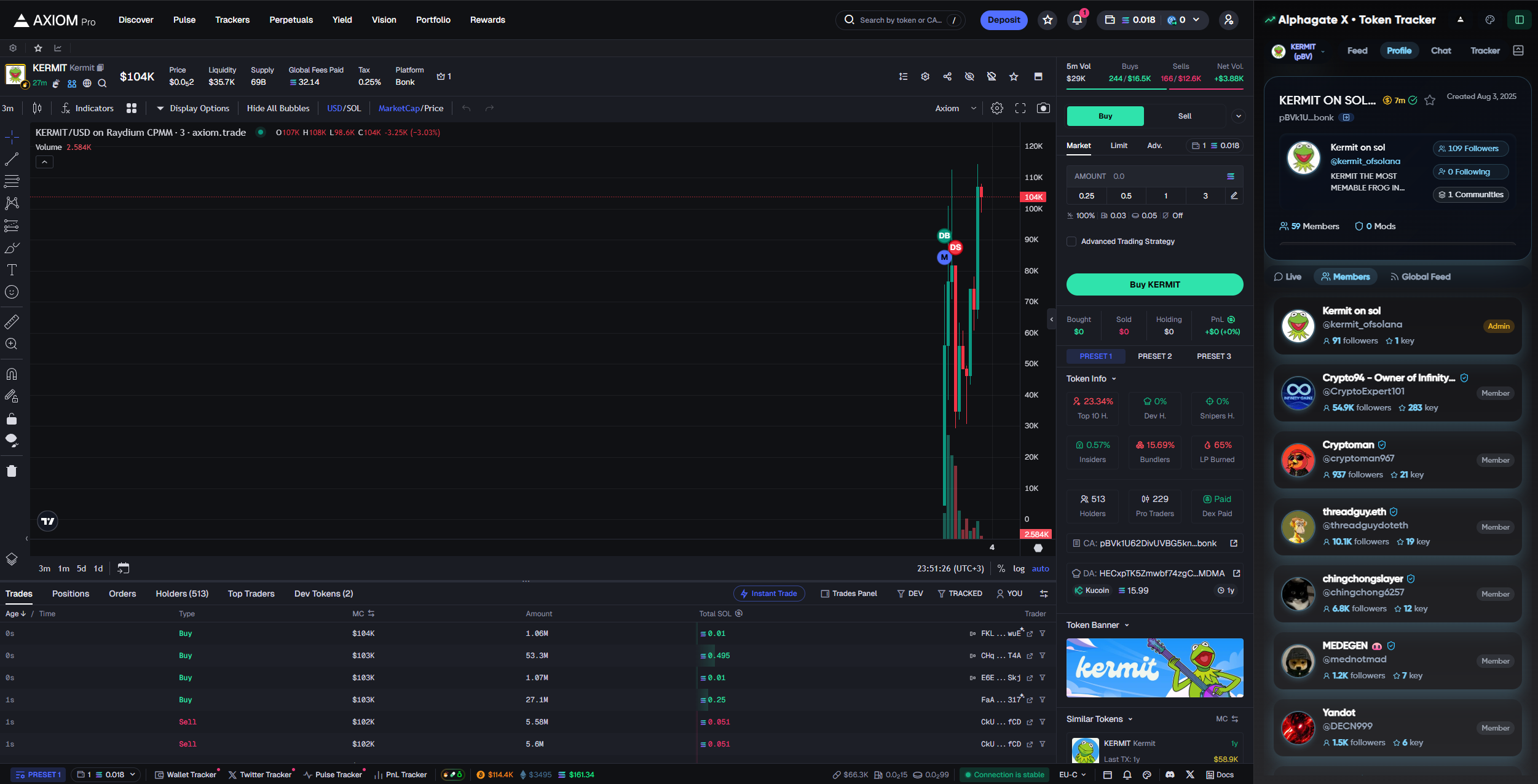
For **community  tokens**, the Profile view includes a full breakdown of:

* Known **members** in the community (sorted by **Key Profile Score** — highest to lowest)
* **Alphagate data**, including:

  * Previous launched communities of the creator
  * Contract mentions&#x20;
  * Account renames & more

  &#x20;&#x20;

TL;DR

**Profile** gives you everything happening around a token in real time — tweets, mentions, social signals, and risky deletes — all streamed live and tied to the token you’re watching.

No extra tabs. No wasted time. Just full awareness, right where you’re trading.

{% columns %}
{% column %}

<figure><img src="https://3883845459-files.gitbook.io/~/files/v0/b/gitbook-x-prod.appspot.com/o/spaces%2FkYOwxgjAF3N544ot4Zcf%2Fuploads%2FwNFCFovTrvz0YrEc3FjO%2Fimage.png?alt=media&amp;token=89410d74-0e05-4c38-8392-3f0147c9ae03" alt=""><figcaption></figcaption></figure>
{% endcolumn %}

{% column %}

<figure><img src="https://3883845459-files.gitbook.io/~/files/v0/b/gitbook-x-prod.appspot.com/o/spaces%2FkYOwxgjAF3N544ot4Zcf%2Fuploads%2Fc7aj7YYuoDuIryGpclFU%2Fimage.png?alt=media&amp;token=fdafe429-b51c-407d-b91b-2ea89faf27a8" alt=""><figcaption></figcaption></figure>
{% endcolumn %}
{% endcolumns %}

Chat

&#x20;**Chat** lets users run quick commands directly inside the platform — similar to a Telegram or Discord bot. It’s designed as a utility layer where you can access data fast without switching tools.

#### &#x20;Available Commands

* **`/x username`**\
  Scans a Twitter profile and returns Alphagate data — including KP data, tags, rename history, and mentioned contracts.
* **`/ca contract`**\
  Checks the contract for any previously linked projects.

**Command results are private** — only visible to the user who runs them. Regular messages, without commands, are visible to all subscribers.

We’ll continue expanding the command set so users can do more directly through chat.

## Tracker

Soon.

**Note:** This is the first version of the feature — bugs may pop up, and we're actively improving it. More filters, profiles, and enhancements are on the way.\
If you have feedback, suggestions, or spot any bug, please let us know. 🤝


# Discover

Welcome to the Discover page, where you can explore a curated selection of projects as they are captured in real-time. \
\
By default, projects are presented in descending order, with the newest entries appearing first. The page is designed to automatically refresh to keep you up to date.

<figure><img src="https://3883845459-files.gitbook.io/~/files/v0/b/gitbook-x-prod.appspot.com/o/spaces%2FkYOwxgjAF3N544ot4Zcf%2Fuploads%2FXqq1HRoUYvdDQQ8to77O%2Fchrome_8tRAJbLOM2.gif?alt=media&amp;token=100f37a6-a02d-4bb7-aaf1-7a7df787362d" alt=""><figcaption><p>A video quickly showing the functionalities of Discover</p></figcaption></figure>

## Filters

<figure><img src="https://3883845459-files.gitbook.io/~/files/v0/b/gitbook-x-prod.appspot.com/o/spaces%2FkYOwxgjAF3N544ot4Zcf%2Fuploads%2FHFhDCKrcnoXvAayRRRtf%2Fimage.png?alt=media&amp;token=a9fea547-9453-4740-ac46-64f9653d8b9a" alt=""><figcaption><p>Discover Filters</p></figcaption></figure>

* **Chain:**\
  Easily focus on projects from specific chains by selecting the ones you’re interested in.
* **Category:**\
  Explore projects by choosing from a variety of categories to find exactly what fits your interests.
* **Social:**\
  Filter for projects with specific social platforms like Discord, Telegram, DexScreener, GitHub, Medium, Mirror, or Linktr, so you can quickly connect and engage.
* **Followers and Keyfollowers:**\
  Set the follower range a project must meet to show up in your Discover feed, making it easy to find projects with the right level of traction.
* **Sort:**\
  Sort by "Created" to find the newest Twitter accounts or "Key Followers" to discover accounts with strong influencer backing. Pair this with the Date Picker for even more targeted results.
* **Date Picker:**\
  Fine-tune your search by selecting specific dates or ranges (3, 7, 15, 30, 90, or 180 days). Combine this with the "Sort by Key Followers" filter to uncover top accounts from your chosen timeframe.

{% hint style="info" %}
By selecting '7 days' in the date picker and sorting by key followers, you can quickly identify high-quality projects that were found in the past week. Refine your search further by applying a max followers filter.
{% endhint %}

* **Exclude:**\
  Want to skip NFT projects or memecoins? Just toggle these options, and they’ll be filtered out. Filters automatically reset when you refresh the page.
* **Options:**\
  Save time by setting your filter preferences as the default with "Set Default Query," or start fresh by clicking "Clear Filters" to return to the default Discover page.
* **Unfiltered Results:**\
  The Unfiltered Results toggle-bar enables you to switch to raw results, where you may encounter a broader range of profiles, including humans and potentially irrelevant accounts. We recommend using this feature when none of our admins are online to ensure you don't miss out on projects that didn't initially meet our filters. Rest assured, any relevant projects will be manually added once we're back online.&#x20;

<br>

### **Search Bar**

<div align="left"><figure><img src="https://3883845459-files.gitbook.io/~/files/v0/b/gitbook-x-prod.appspot.com/o/spaces%2FkYOwxgjAF3N544ot4Zcf%2Fuploads%2F9q37paLcqCxecXg4Y3Mm%2F5.png?alt=media&amp;token=495374ca-f412-4c56-922f-27d1a517921c" alt=""><figcaption><p>Search Bar in Discover</p></figcaption></figure></div>

The search bar provides two distinct search options:

* **Projects:** \
  When set to "Projects," you can search for specific project names or keywords related to projects of interest. As you type, the page will refresh and display matching projects.
* **Bio:** \
  Switch to "Bio" to search for keywords within project bios. Our database currently includes over 1m+ projects and continues to grow, making it easier for you to find precisely what you're looking for.


# Followings

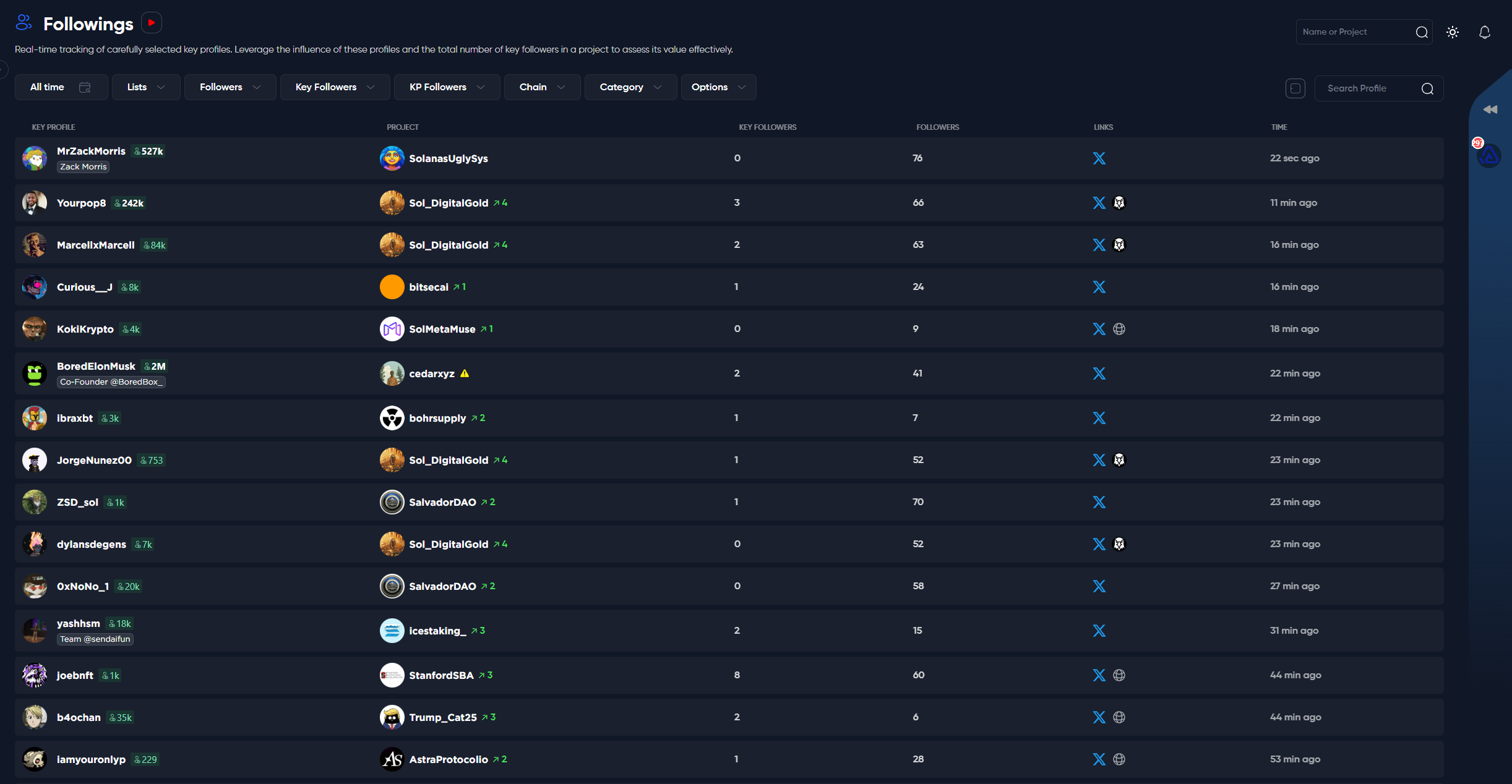
The "Followings" section is the cornerstone of Alphagate, as the majority of our information is sourced from here.

A key distinction between Followings and [**Discover**](/features/discover) is that within the Followings section, projects may appear multiple times if they are followed by key profiles, whereas in the Discover section, projects are displayed only once.

### Followings

As you may already be aware, we monitor over 7300 Crypto Twitter (CT) profiles and adding more each day. By analyzing their followings, we identify projects, conduct in-depth analyses, and generate insights to provide users with a competitive edge in the market.

<figure><img src="https://3883845459-files.gitbook.io/~/files/v0/b/gitbook-x-prod.appspot.com/o/spaces%2FkYOwxgjAF3N544ot4Zcf%2Fuploads%2FErsGgR24XHtwmjVuL3ly%2Fimage.png?alt=media&amp;token=18c1d1a0-8da6-4cab-8073-cb1ba6be37d4" alt=""><figcaption></figcaption></figure>

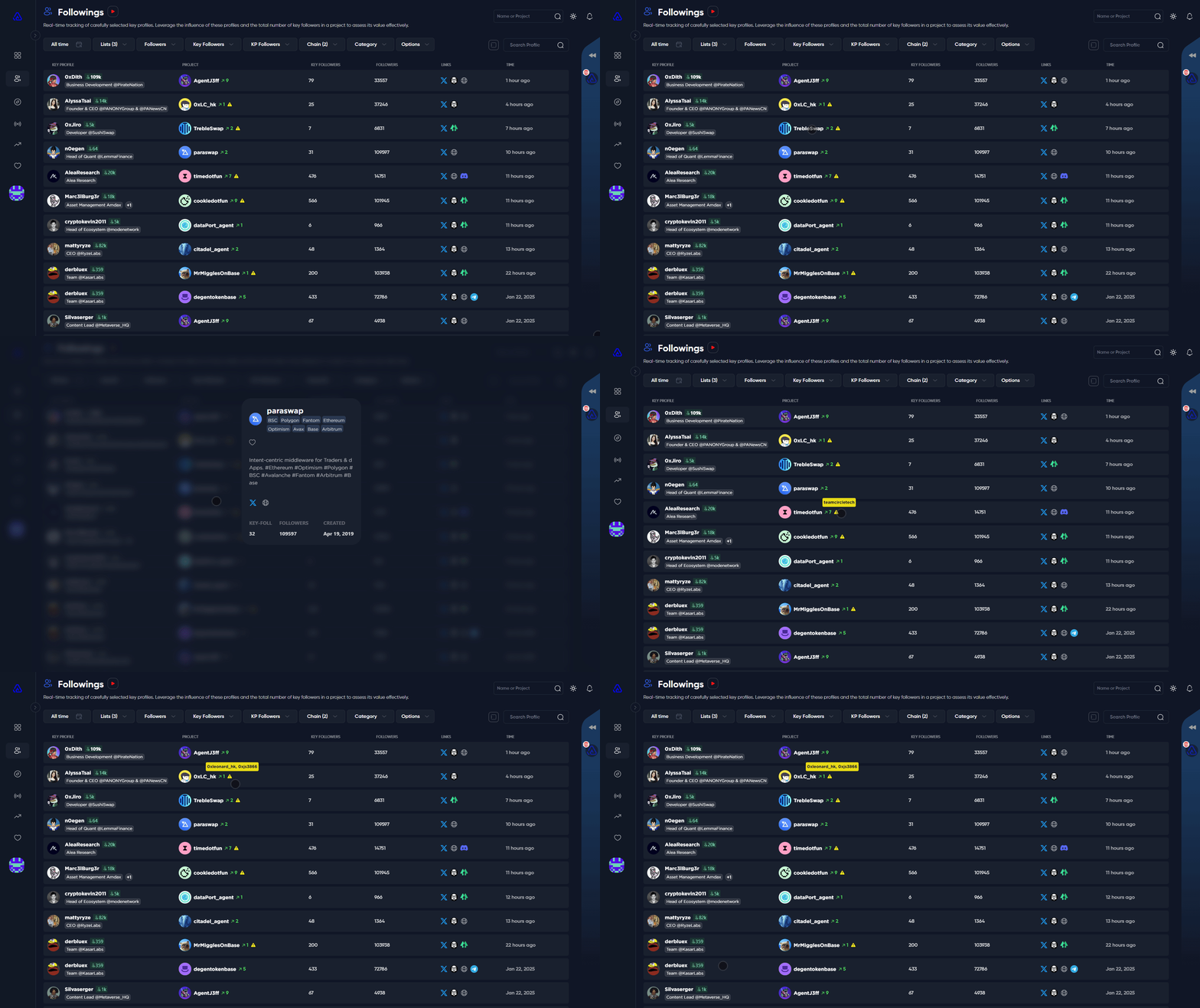
For more details on a particular project, simply click on the project's name. A popup modal will appear, presenting additional information about the project. You can also hover over the yellow icon to see any name changes where applicable.

{% hint style="info" %}
**Tip**: To discover the most followed projects today or over a longer timeframe, refer to the [Trending](/features/trending) section!
{% endhint %}

<figure><img src="https://3883845459-files.gitbook.io/~/files/v0/b/gitbook-x-prod.appspot.com/o/spaces%2FkYOwxgjAF3N544ot4Zcf%2Fuploads%2FXtaiW2HTR7B13DTtRR10%2Fchrome_7Z4ngssFCG.gif?alt=media&amp;token=d0ca9bd5-d633-41d0-a1bc-910bfb00edc4" alt=""><figcaption></figcaption></figure>

### Filters

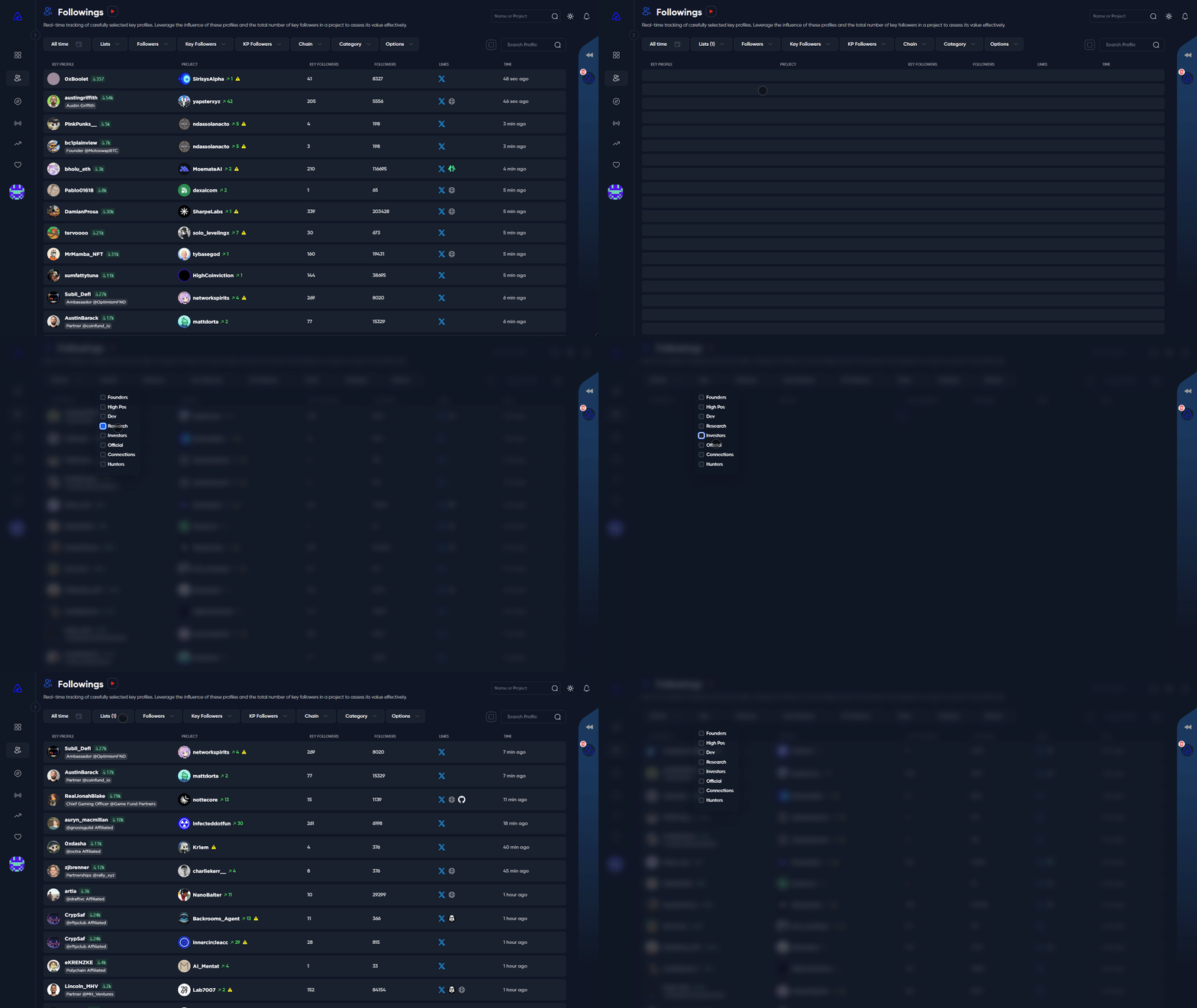
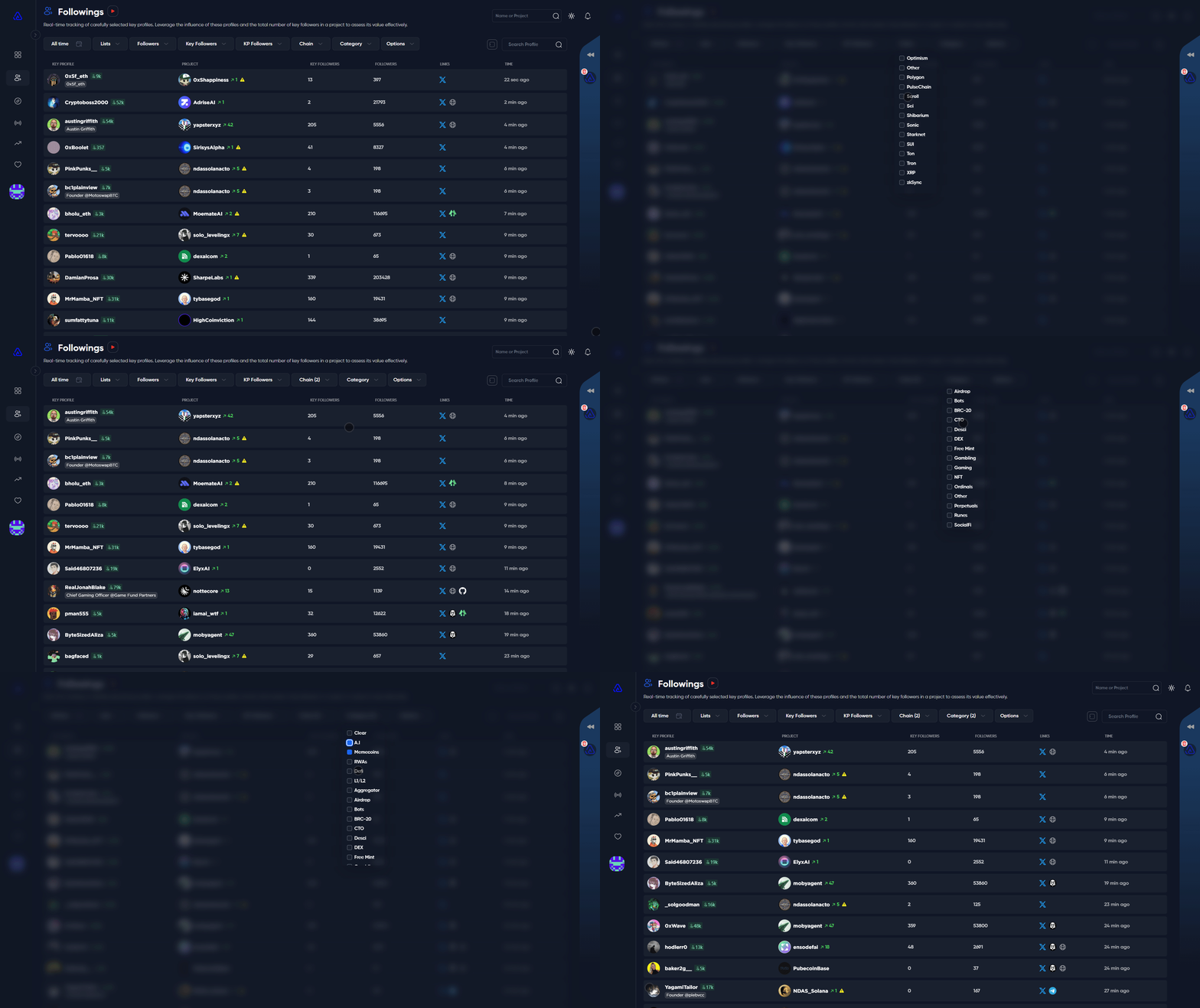
The **"Lists"** filter lets you select from various types of key followers, including Founders, High Positions, Developers, Researchers, Investors, Official Organizations, Connected People, and Regular Hunters. You can choose one or multiple categories to further refine your view.

<figure><img src="https://3883845459-files.gitbook.io/~/files/v0/b/gitbook-x-prod.appspot.com/o/spaces%2FkYOwxgjAF3N544ot4Zcf%2Fuploads%2FjWtrUniCRbMqUB4CgZDE%2Fchrome_idl2PCcNi2.gif?alt=media&amp;token=74345fc5-1657-443e-9a80-6b930b71c7b5" alt=""><figcaption></figcaption></figure>

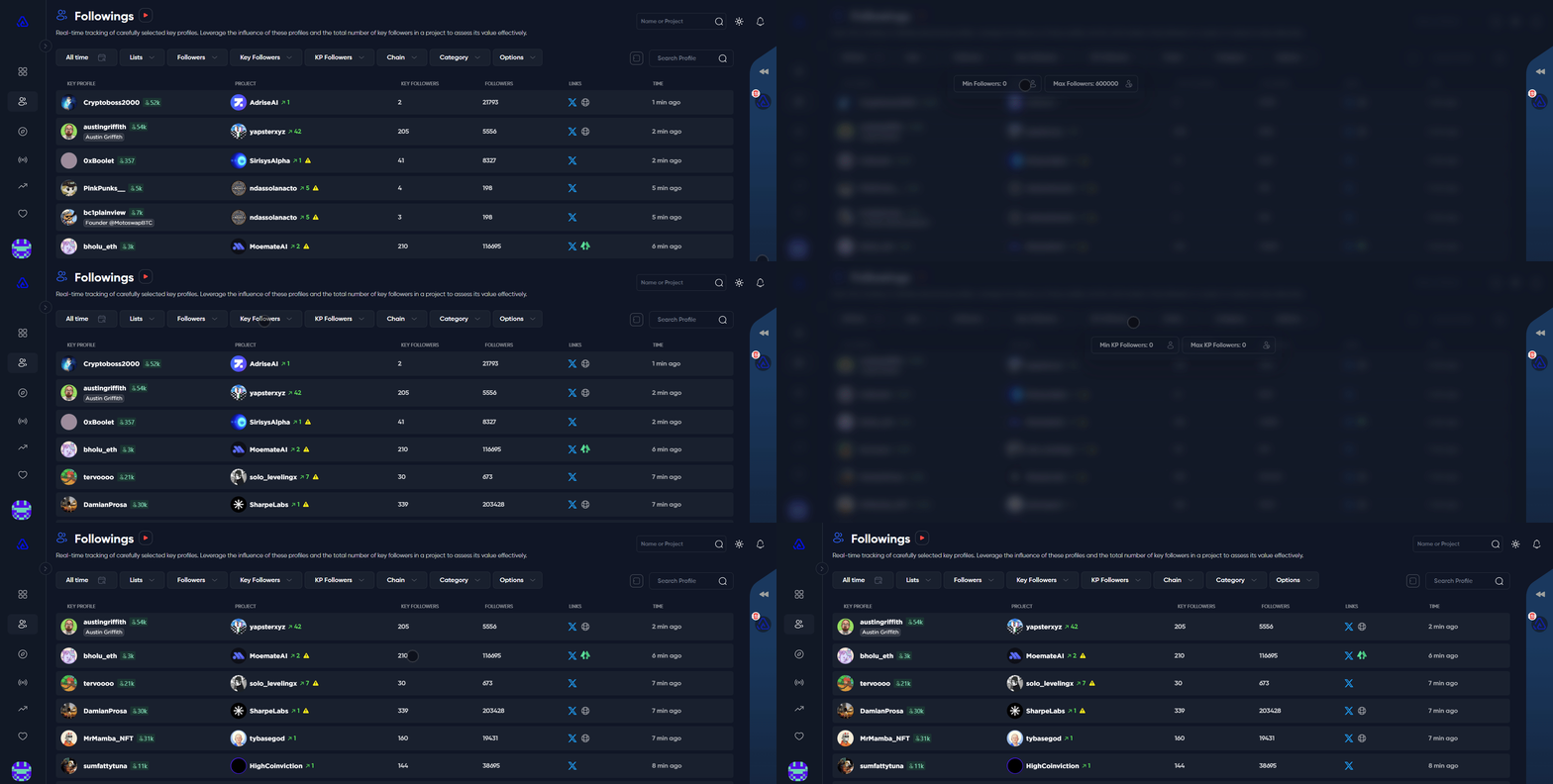
Use the **"Followers"** filter to specify the follower range for projects you're interested in.\
Select the **"Key Followers"** filter to define the key followers range for projects.\
Utilize the **"KP Followers"** filter to determine the follower range of key profiles following a project.<br>

<figure><img src="https://3883845459-files.gitbook.io/~/files/v0/b/gitbook-x-prod.appspot.com/o/spaces%2FkYOwxgjAF3N544ot4Zcf%2Fuploads%2FUeCoxCebKsVohHsb8Lqi%2Fchrome_3jZEsaEi41.gif?alt=media&amp;token=5e037167-b86a-4413-856f-271676b06caf" alt=""><figcaption></figcaption></figure>

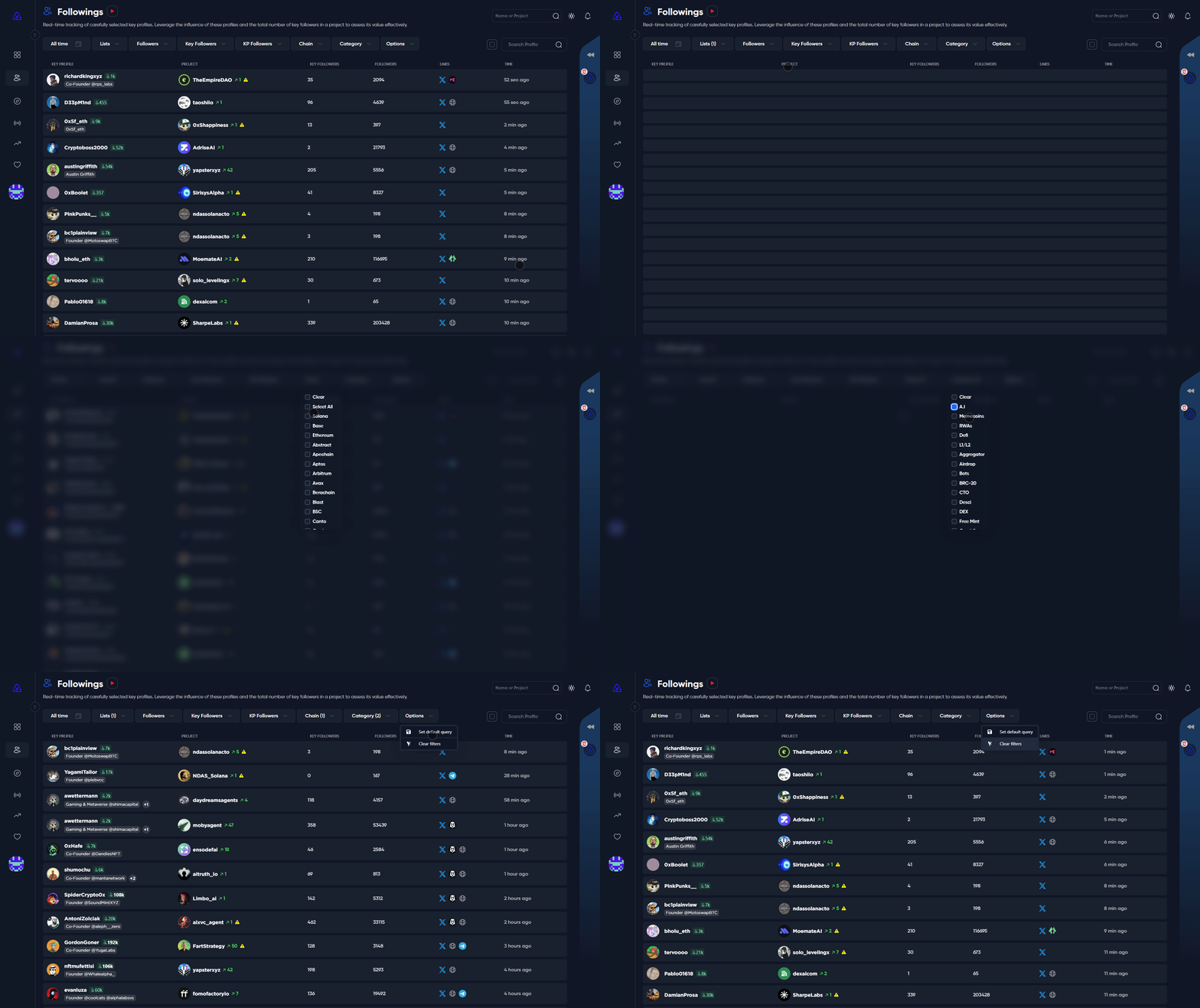
Use the **"Chain"** filter to choose the chains you are interested in. Utilize the **"Category"** filter to explore various categories such as Memecoins, AI, Airdrops, Free Mint, DeFi, and more.\ <br>

<figure><img src="https://3883845459-files.gitbook.io/~/files/v0/b/gitbook-x-prod.appspot.com/o/spaces%2FkYOwxgjAF3N544ot4Zcf%2Fuploads%2FdBrqg2LS9Jy8veQT7yKd%2Fchrome_bbkGCHyvXw.gif?alt=media&amp;token=a36e4757-3f84-42b2-b83c-ae155ae44e8d" alt=""><figcaption></figcaption></figure>

Once you've chosen your filters, click **"Options"** then **"Set default query"** to save your filter preset. Or you can click "Clear filters" to go back to the default settings.<br>

<figure><img src="https://3883845459-files.gitbook.io/~/files/v0/b/gitbook-x-prod.appspot.com/o/spaces%2FkYOwxgjAF3N544ot4Zcf%2Fuploads%2FiNMYtLOuSVMwcudskiWB%2Fchrome_sBNW3z2Tk4.gif?alt=media&amp;token=e14f005f-3435-4727-91c5-bd21bd7a4e7f" alt=""><figcaption></figcaption></figure>

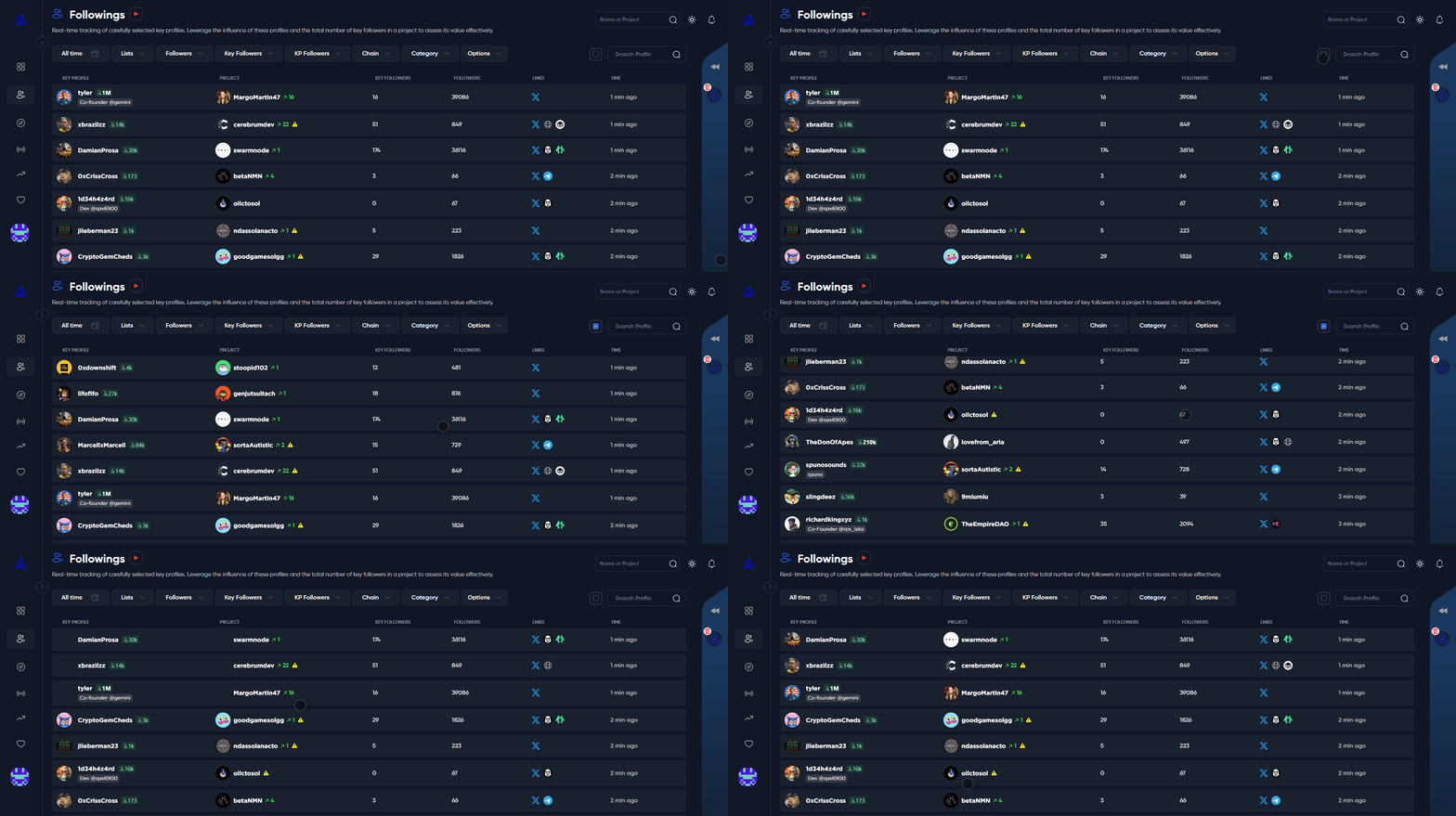
You can click on the <img src="https://3883845459-files.gitbook.io/~/files/v0/b/gitbook-x-prod.appspot.com/o/spaces%2FkYOwxgjAF3N544ot4Zcf%2Fuploads%2FbCgsDZy70VTmBucZ4LKg%2Fimage.png?alt=media&amp;token=5f9e4672-e12a-4e12-babf-f641ef63cb8c" alt="" data-size="line"> icon to view unfiltered results.<br>

<figure><img src="https://3883845459-files.gitbook.io/~/files/v0/b/gitbook-x-prod.appspot.com/o/spaces%2FkYOwxgjAF3N544ot4Zcf%2Fuploads%2FSZ42ciFcm8E3NOywL9ye%2Fchrome_nlruQLJjqN.gif?alt=media&amp;token=95d0556a-651c-4608-a3dc-ea12c3ad28f0" alt=""><figcaption></figcaption></figure>


# Project

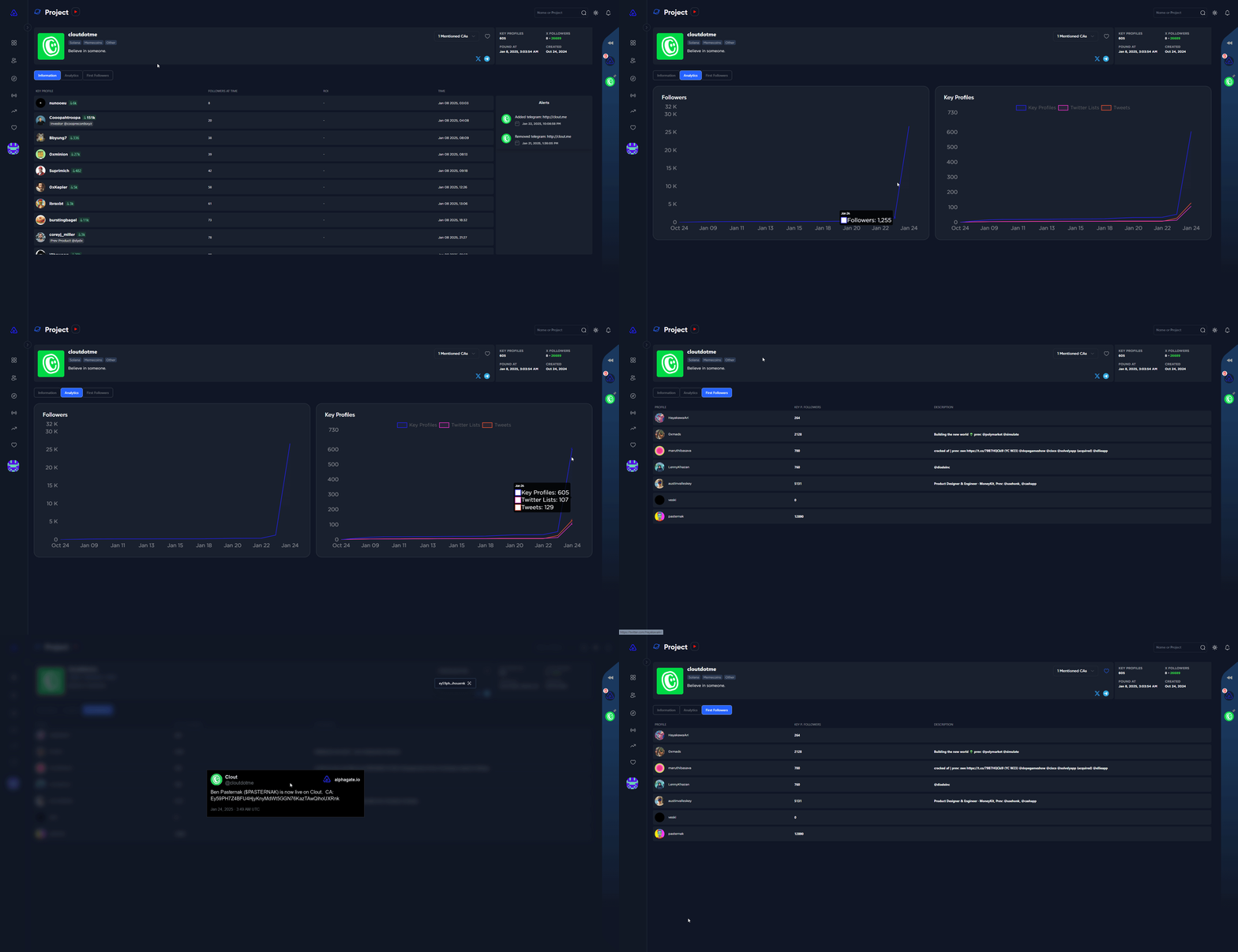
Each project in Alphagate has its own dedicated page, packed with detailed insights about the account. You’ll find two dynamic charts showcasing follower growth and key profile growth, along with metrics for tweet activity and additions to Twitter Lists.

Stay informed with tools that let you track account changes and review a timeline of key profile follows.  Additionally, any contracts associated with the project’s Twitter account are automatically displayed, giving you quick and easy access to important details.

<figure><img src="https://3883845459-files.gitbook.io/~/files/v0/b/gitbook-x-prod.appspot.com/o/spaces%2FkYOwxgjAF3N544ot4Zcf%2Fuploads%2FKWBIMeQhtjdV9vyQWqwE%2Fchrome_P125eGK52b.gif?alt=media&amp;token=354592e4-7d07-4e1c-b347-53431c99e652" alt=""><figcaption></figcaption></figure>

We also highlight the account’s very first followers, even if they’re not on our key profile list. This helps you identify potentially valuable early hunters and even request us to add them to the key follower list for better tracking and insights.

<figure><img src="https://3883845459-files.gitbook.io/~/files/v0/b/gitbook-x-prod.appspot.com/o/spaces%2FkYOwxgjAF3N544ot4Zcf%2Fuploads%2Fu4MqVP6NEsfGAOetNTgT%2Fimage.png?alt=media&amp;token=48f78473-7e46-43a2-af21-c5a6a61124f4" alt=""><figcaption><p>First normal followers</p></figcaption></figure>


# KeyProfile

Key Profiles include CT Alpha Hunters, VC's, Devs, Founders, and Official projects selected by our team over two years. We've also added profiles based on subscriber feedback. We prioritize quality and remove profiles linked to scams or poor choices.

Search for key profiles via the [**Followings**](/features/followings) tab or use the top-right search bar.

By tapping the heart icon, the key profile will be added to your [Watchlist](/features/watchlist), and you will get notifications of new follows via our website and [Telegram Bot](/features/telegram-bot).

**Tags:**\
Our team assigns specific tags to each key profile. You can personalize by adding your own tags and even opt to conceal the default ones.

<figure><img src="https://3883845459-files.gitbook.io/~/files/v0/b/gitbook-x-prod.appspot.com/o/spaces%2FkYOwxgjAF3N544ot4Zcf%2Fuploads%2FHdLr695BfGtqs4zKurqA%2Fchrome_n9FxGzrqNa.gif?alt=media&amp;token=fb31dd2e-0997-4504-85e0-1551b1ec84f1" alt=""><figcaption></figcaption></figure>


# Trending

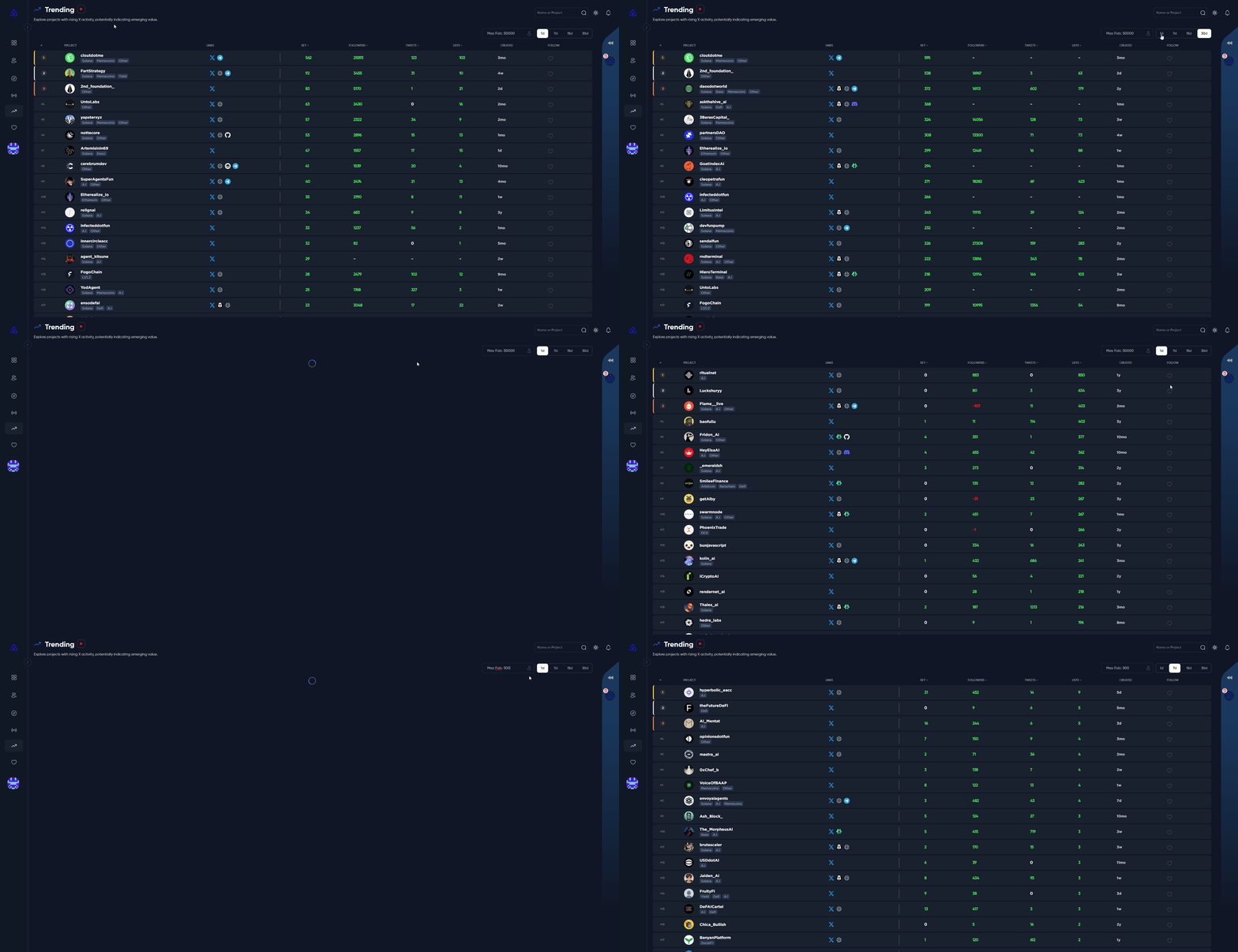
The Trending feature keeps you in the loop with real-time Twitter trends, showing you where interest is shifting and which projects are gaining attention. It’s a great way to stay ahead and spot opportunities as they emerge.

Projects are automatically sorted by the growth of key followers over your chosen timeframe—1 day, 7 days, 15 days, or 30 days. You can also explore other valuable stats, like tweet growth, the number of Twitter Lists a project has been added to, and total follower growth.

Want to customize your view? Sort projects by key followers, total followers, tweets, or lists in either ascending or descending order. Found something worth tracking? Just click the heart icon to add it to your watchlist.

This tool helps you identify which projects are gaining momentum, analyze market trends, and make informed decisions quickly and effectively.

<figure><img src="https://3883845459-files.gitbook.io/~/files/v0/b/gitbook-x-prod.appspot.com/o/spaces%2FkYOwxgjAF3N544ot4Zcf%2Fuploads%2FFdjsf2jTvV5q7n6d249B%2Fchrome_vyN9MpTbBd.gif?alt=media&amp;token=4f71a602-e052-4c75-a47c-51e82a6c5ba7" alt=""><figcaption></figcaption></figure>

{% hint style="info" %}
**Tip**: Regularly checking the *1d* and *7d* timeframes can help you spot emerging projects or discern the interests of key profiles. \
\
Adjusting the maximum number of followers to a number below the default will assist you in discovering trending projects that have a smaller following.
{% endhint %}

<br>


# Feed

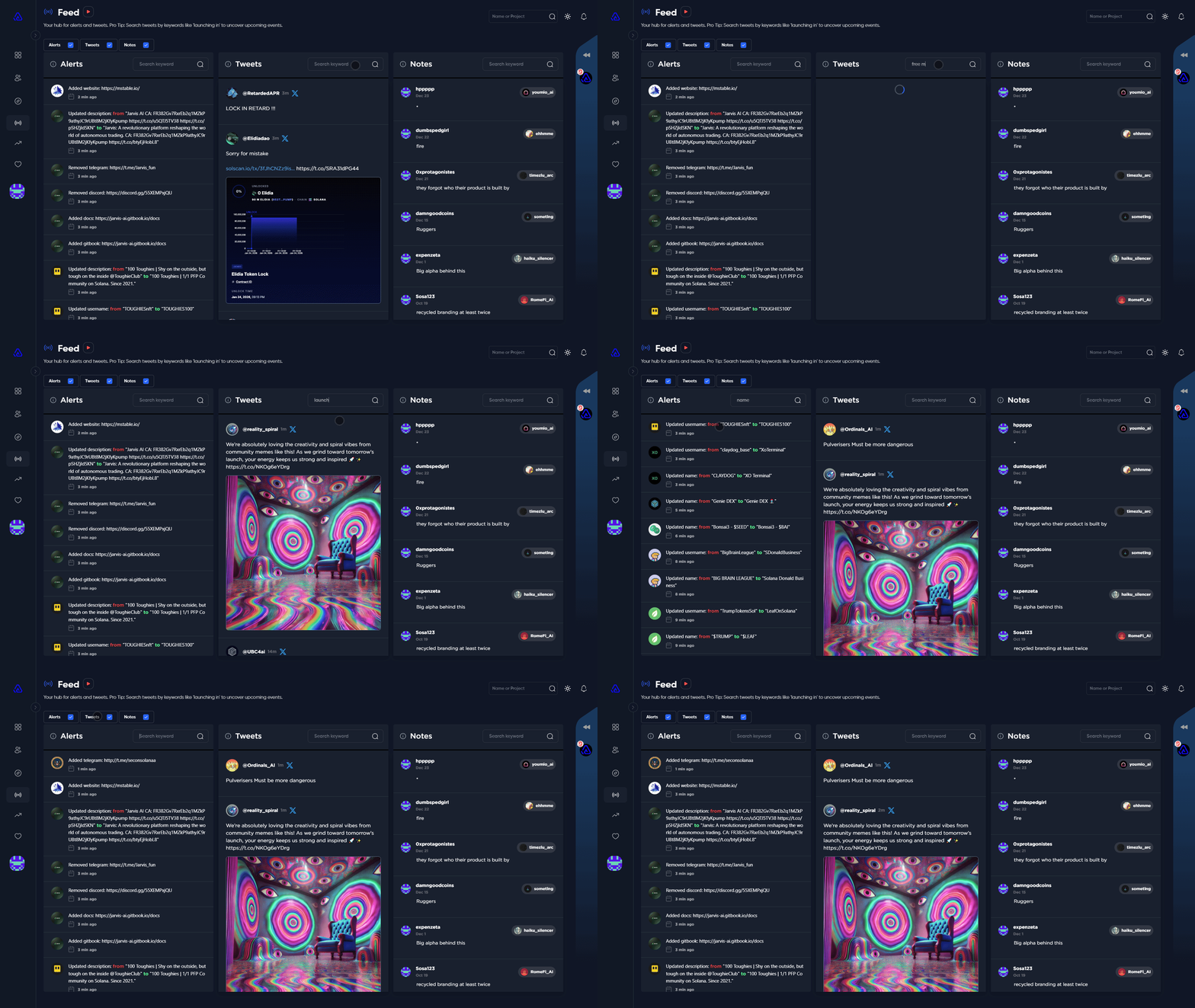
The Feed page showcases current events and pertinent information.&#x20;

It's divided into three sections: Alerts, Tweets, and Notes.
<figure><img src="https://3883845459-files.gitbook.io/~/files/v0/b/gitbook-x-prod.appspot.com/o/spaces%2FkYOwxgjAF3N544ot4Zcf%2Fuploads%2FTP5eUigY7Xiz0S21TUuW%2Fchrome_fW99zdUL5N.gif?alt=media&amp;token=ffe91058-f62a-406f-93be-7078e4ca17ff" alt=""><figcaption><p>Feed page examples</p></figcaption></figure>

### Alerts

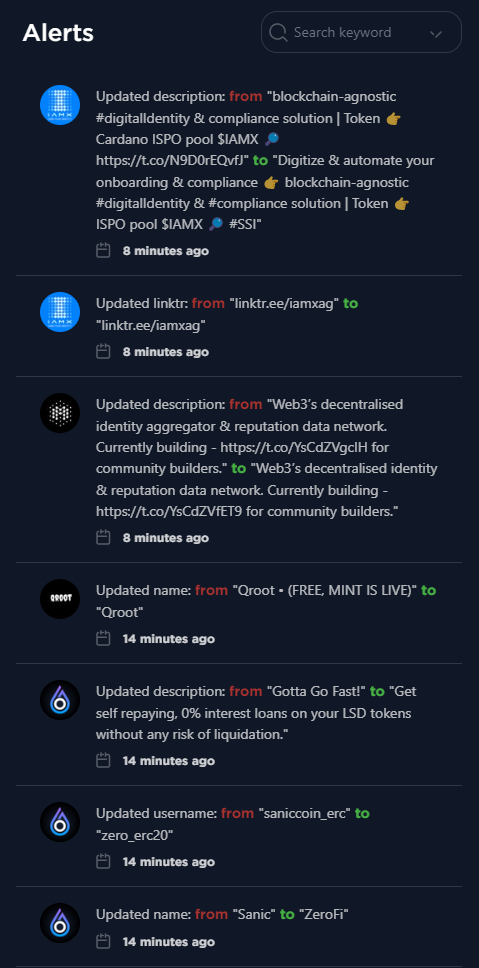
This section displays real-time account changes for all projects. Users can utilize the text search feature to look for username alterations, sift through keywords in names, usernames, bios, and more.

{% hint style="info" %}
**Tip**: Scanning for username changes can be a useful strategy to detect potential scams.
{% endhint %}

<figure><img src="https://3883845459-files.gitbook.io/~/files/v0/b/gitbook-x-prod.appspot.com/o/spaces%2FkYOwxgjAF3N544ot4Zcf%2Fuploads%2FbnOnw7j7Bj2F9dXoMXlf%2F5ZxBdHvcTW.png?alt=media&amp;token=08f1ea59-55c5-47a5-9f89-7dbcea8a0915" alt="" width="359"><figcaption><p>Alerts</p></figcaption></figure>

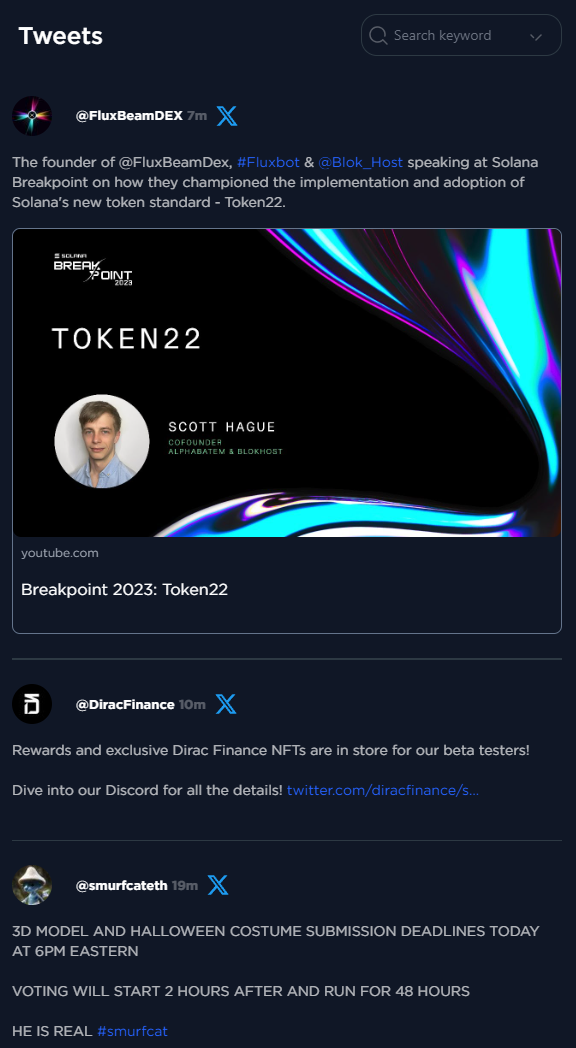
### Tweets

The Tweets feed presents live tweets from all Alphagate projects that users have added to their Watchlist. It's recommended to frequently add projects to your Watchlist and keep it updated.

{% hint style="info" %}
**Tip**: Regularly search for keywords such as "launch," "presale," "airdrop," "free mint," and others to uncover alpha and seize various opportunities!
{% endhint %}

<figure><img src="https://3883845459-files.gitbook.io/~/files/v0/b/gitbook-x-prod.appspot.com/o/spaces%2FkYOwxgjAF3N544ot4Zcf%2Fuploads%2F4ZTbMytvo3gKlNqvAdJJ%2FFP3CCGi3pq.png?alt=media&amp;token=faf9143d-df82-44e8-8d6a-7afb8427d3d2" alt="" width="432"><figcaption><p>Tweets</p></figcaption></figure>

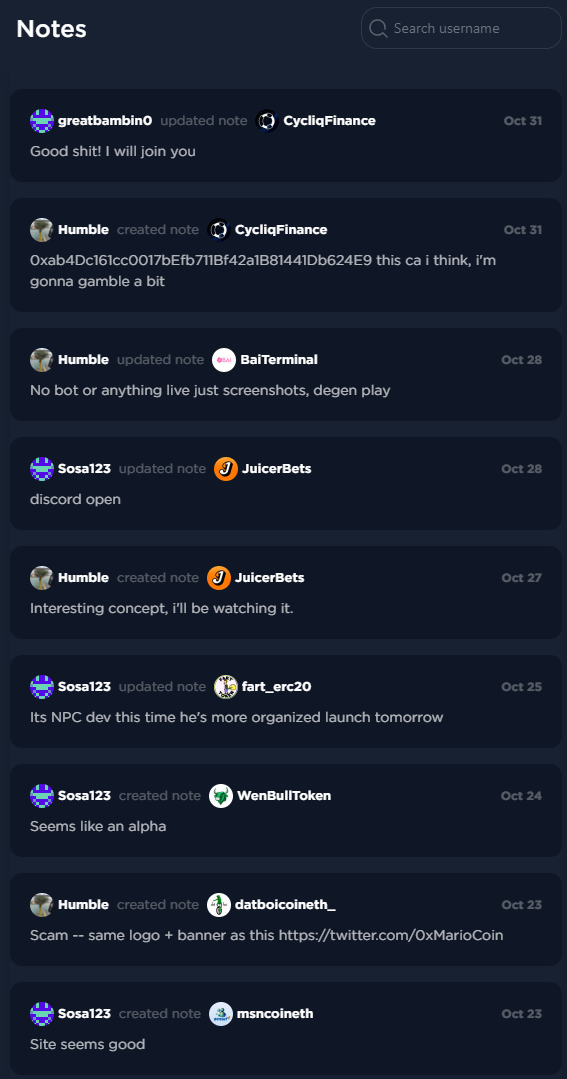
### Notes

The final section displays the most recent notes added to projects by Alphagate users.

<figure><img src="https://3883845459-files.gitbook.io/~/files/v0/b/gitbook-x-prod.appspot.com/o/spaces%2FkYOwxgjAF3N544ot4Zcf%2Fuploads%2F2qjZpOwfq0QLd6AZABHW%2Fchrome_3fKMxEojaZ.png?alt=media&amp;token=9f753a77-20dc-4880-9c9e-cf101cdb353f" alt="" width="425"><figcaption><p>Tweets</p></figcaption></figure>


# Watchlist

You are able to add Projects and key profiles to your watchlist, refer to the sections below for more details!

{% content-ref url="/spaces/kYOwxgjAF3N544ot4Zcf/pages/oJeYf8QA6hyhRhNL5fvW" %}
[Projects](/features/watchlist/projects)
{% endcontent-ref %}

{% content-ref url="/spaces/kYOwxgjAF3N544ot4Zcf/pages/BTNjn5TGBMaAxE4MIW53" %}
[Key profiles](/features/watchlist/key-profiles)
{% endcontent-ref %}


# Projects

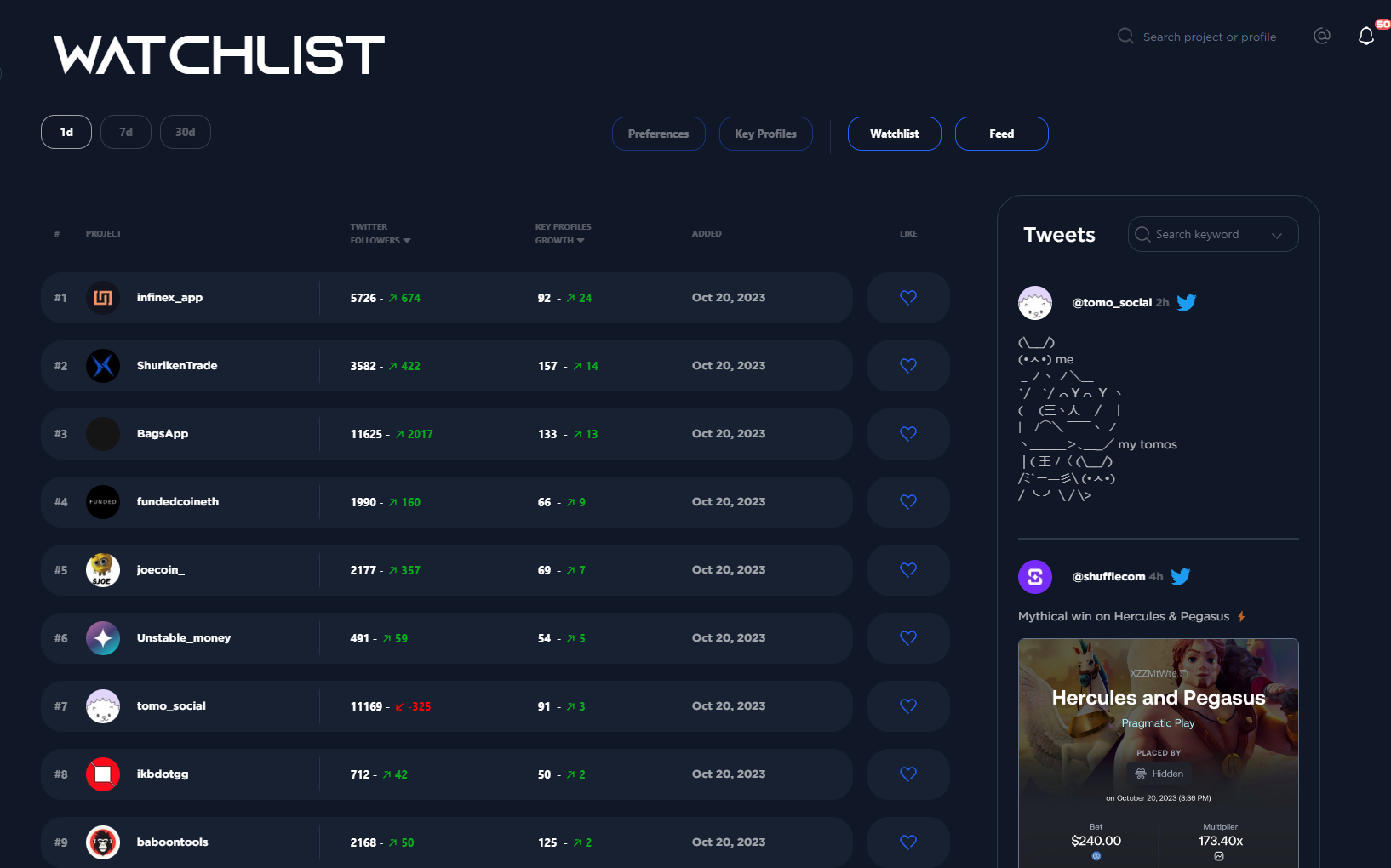
You can add projects that you prefer to your personal watchlist simply by clicking the "heart" icon found on either the [Discover](/features/discover) page or the individual [Project](/features/project) page.

By adding a project to your watchlist you will be monitoring their follower growth in real time and receive notifications of their Tweets and account updates (e.g if they add a website to their bio).

You can sort projects in your watchlist with the following filters:&#x20;

* **Twitter Followers**
* **Followers Growth**
* **Key Profiles Growth**
* **Key Profiles**

By default we display projects from newest to oldest added.

<figure><img src="https://3883845459-files.gitbook.io/~/files/v0/b/gitbook-x-prod.appspot.com/o/spaces%2FkYOwxgjAF3N544ot4Zcf%2Fuploads%2FHQFC2Hj4x7J2B8DHrsc7%2F9.png?alt=media&amp;token=8b72d96c-19c8-440b-bc40-72604a07c397" alt=""><figcaption><p>Default Watchlist View</p></figcaption></figure>

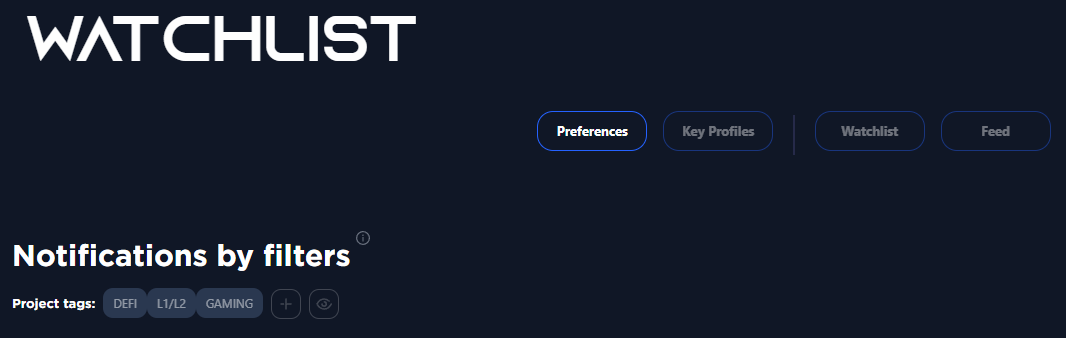
Using the preferences button, you can customize alerts for specific Tags and Chains. For instance, if you wish to be notified about each new "DeFi" category project we identify, just add 'DeFi' to your preferences. We'll notify you of any new discoveries on both Alphagate's website and [**Telegram Bot**](/features/telegram-bot). You can select numerous chains and categories to monitor.

<figure><img src="https://3883845459-files.gitbook.io/~/files/v0/b/gitbook-x-prod.appspot.com/o/spaces%2FkYOwxgjAF3N544ot4Zcf%2Fuploads%2FyUjLkiCcFiawjHa1c1Nc%2F10.png?alt=media&amp;token=7e4a3752-3888-414a-aa8a-36213d892705" alt=""><figcaption></figcaption></figure>

\
\
Refer to [**Key Profiles**](/features/watchlist/key-profiles) to find out what this button does!


# Key profiles

Search for a profile using the top-right search bar or via the [**Followings**](/features/followings) page, then click the heart icon to add it instantly to your watchlist.

You can then navigate to [**Watchlist**](/features/watchlist) and click on the Key profiles button. On the left you will see all the profiles you have in your watchlist and on the right you will see what your selected key profiles followed last.<br>

<figure><img src="https://3883845459-files.gitbook.io/~/files/v0/b/gitbook-x-prod.appspot.com/o/spaces%2FkYOwxgjAF3N544ot4Zcf%2Fuploads%2FrxNrQuaEwaHjS1G3z2xH%2Fchrome_OHfYP9DXeH.gif?alt=media&amp;token=732633f7-af72-4ffd-a3c2-bd347904d4ce" alt=""><figcaption><p>How to add a key profile to your watchlist</p></figcaption></figure>

You'll be notified on both the Alphagate website and via the [**Telegram Bot** ](/features/telegram-bot)whenever an account on your watchlist follows a project.\
\
Notifications are automatically turned on for every important profile on your watchlist, but you can opt out by clicking the bell icon next to each account in the left column.


# Preferences

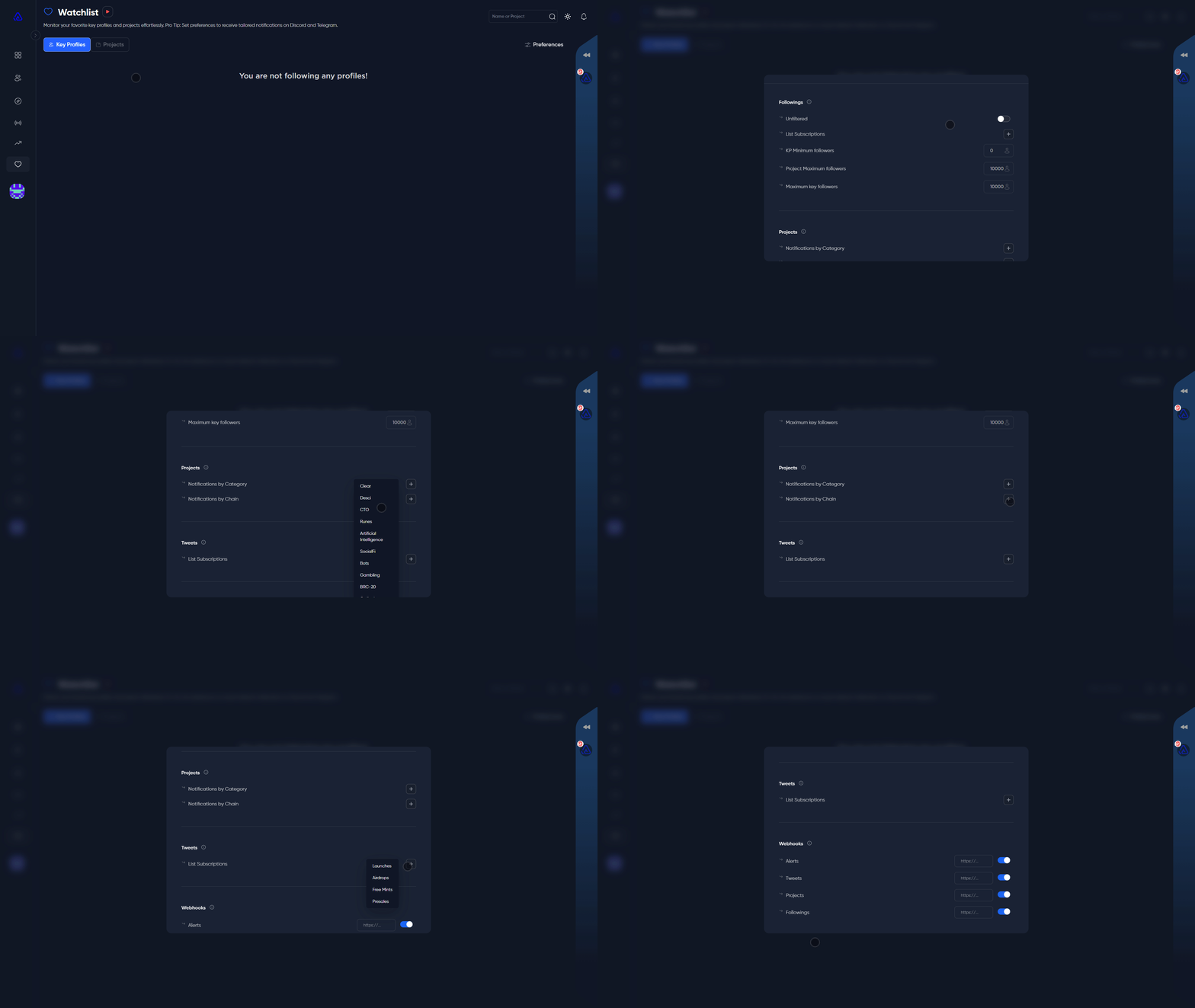
The **Watchlist Preferences** section in Alphagate allows you to tailor your alerts and notifications to focus on the most relevant and actionable updates. Here’s an overview of what each setting does and how it helps you stay informed:

<figure><img src="https://3883845459-files.gitbook.io/~/files/v0/b/gitbook-x-prod.appspot.com/o/spaces%2FkYOwxgjAF3N544ot4Zcf%2Fuploads%2F0uCNOz2xUzEhtGxAFAd2%2Fchrome_mUp6XzAtdJ.gif?alt=media&amp;token=b8bb457a-40ae-4245-aa6c-95c614a83ea8" alt=""><figcaption></figcaption></figure>

***

### Followings

* **Unfiltered**: Enable this to receive all following updates without any restrictions or filters. Perfect for those who want a comprehensive view of activity. (recommended)
* **List Subscriptions**: Choose specific categories of key followers to monitor closely. You can focus on:

  * Founders
  * Developers
  * High-ranking positions
  * Official organizations
  * Investors
  * Researchers
  * Connections

  This helps you track the movements of key players that matter most to you.

{% hint style="warning" %}
By choosing lists, you'll get notifications from all key profiles in that list, potentially leading to thousands of alerts.
{% endhint %}

* **KP Minimum Followers**: Set a threshold for the minimum number of followers a Key Profile must have to trigger alerts. This ensures you’re focusing on more influential accounts.
* **Project Maximum Followers**: Limit alerts to projects that have no more than a specified number of followers, allowing you to identify newer or emerging projects.
* **Maximum Key Followers**: Define the maximum number of key followers an account should have to show up in your updates. Ideal for finding early-stage opportunities.

***

### Projects

* **Notifications by Category**: Receive alerts based on the category a project fits into. Categories include:

  * AI
  * Memecoins
  * DeFi
  * DEX (Decentralized Exchanges)
  * And much more...

  This helps you focus on sectors you’re interested in without being overwhelmed by irrelevant updates.
* **Notifications by Chain**: Get updates for projects based on the blockchain they’re on. For example, Base, Solana, Ethereum, etc. This feature is perfect for keeping track of projects within ecosystems you’re most active in.

***

### Tweets

* **List Subscriptions**: Stay informed about key events like:
  * Airdrops
  * Free mints
  * Presales
  * Launches This feature ensures you never miss out on time-sensitive opportunities by notifying you when relevant tweets appear.

***

### Webhooks

* Connect Alphagate to your discord server via Webhooks to receive real-time alerts directly. Webhooks are available for alerts, tweets, projects, and followers, making it easier to integrate Alphagate updates into your workflow or preferred communication channels.

***

By setting your preferences in the Watchlist, you’ll save time, reduce noise, and focus on the updates that align with your goals and strategies. Alphagate empowers you to stay ahead in the dynamic world of crypto with precision and ease.


# Telegram Bot

You can start using our Telegram bot (@alphatelegrambot) by adding your Telegram ID in the [Alphagate account settings](https://alphagate.io/account).

<div align="left"><figure><img src="https://3883845459-files.gitbook.io/~/files/v0/b/gitbook-x-prod.appspot.com/o/spaces%2FkYOwxgjAF3N544ot4Zcf%2Fuploads%2FMsHSLiUuZ9KXQLlEvbl8%2Fimage.png?alt=media&amp;token=1e3d2412-3680-4c70-a7c0-7223ca625e25" alt=""><figcaption></figcaption></figure></div>

{% hint style="info" %}
(We only request to see your Telegram ID so we can authenticate you)
{% endhint %}

After you added your telegram in our website navigate to [this bot](https://t.me/alphatelegrambot) and click "Verify Auth". \
If you have a valid subscription the bot will give you access to 3 groups:

* Discover\
  [Discover](/features/discover) but in Telegram.
* Followings:\
  [ **Followings**](/features/followings) but in Telegram.
* Chat:\
  Private chat for Alphagate subscribers.

![](https://3883845459-files.gitbook.io/~/files/v0/b/gitbook-x-prod.appspot.com/o/spaces%2FkYOwxgjAF3N544ot4Zcf%2Fuploads%2F7y4raj9cgRDbuMqXs9U7%2Fimage.png?alt=media\&token=019de306-c57f-4e37-a8e8-b7d3ae192360)

By default you will be receiving notifications for all the Projects or Key Profiles in your [**Watchlist** ](/features/watchlist)from this [Bot](https://t.me/alphatelegrambot) (@alphatelegrambot)

![](https://3883845459-files.gitbook.io/~/files/v0/b/gitbook-x-prod.appspot.com/o/spaces%2FkYOwxgjAF3N544ot4Zcf%2Fuploads%2FHgsTk8Dun7AlsLfLVbFX%2Fimage.png?alt=media\&token=3824a8b6-efca-46fa-9461-c8c026b6b973)

At the time of writing we have 2 available commands with more to come.

/project + username gives you a summary of how many Key Profiles follow the project, when it was created, how many total followers it has, when we found it, Chain, Tag, Links, Twitter Bio and some of the first people who followed it (We only display a full list on our [website](https://alphagate.io/))

![](https://3883845459-files.gitbook.io/~/files/v0/b/gitbook-x-prod.appspot.com/o/spaces%2FkYOwxgjAF3N544ot4Zcf%2Fuploads%2Fx2FoYNpNTpuzeUEo8p28%2Fimage.png?alt=media\&token=1dbae8a1-1409-462e-a4b7-066533cdf96e)

/alerts + username gives you a summary of all the account changes on that specific account, if they have a username change or added a website then removed it, it will be shown there.

![](https://3883845459-files.gitbook.io/~/files/v0/b/gitbook-x-prod.appspot.com/o/spaces%2FkYOwxgjAF3N544ot4Zcf%2Fuploads%2FoLaChzHdyiPt6vjClR8A%2Fimage.png?alt=media\&token=ac54a8ce-2326-4435-b84e-d7912388dd2d)


# Chat

Since the inception of Alphagate, our vision has been to create an all-in-one crypto Alpha platform. While our focus is on discovering alpha, we equally prioritize community engagement. Our aim is to equip users with tools that foster collaboration, allowing them to share information, knowledge, and any valuable findings that can benefit others. This is why, in addition to project notes, we introduced the chat feature.

### Description

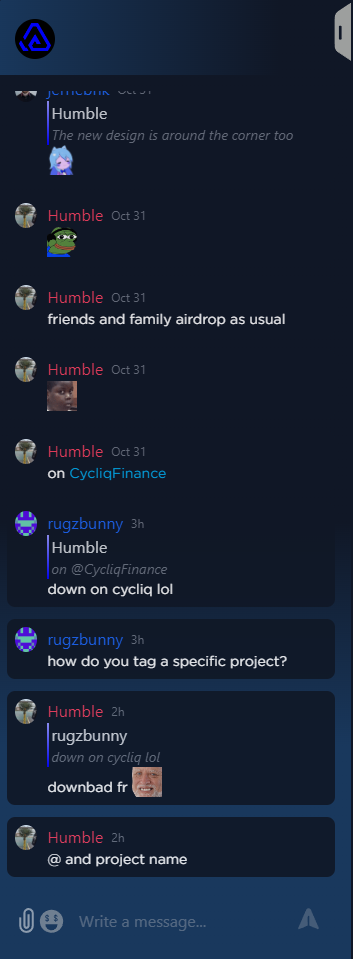
The chat component is located on the right side of the platform and can be expanded. The unique aspect of our chat is that each project has its own dedicated chat room. This ensures that discussions remain organized and streamlined, unlike in platforms like Discord where information can get buried amidst a flurry of messages, necessitating users to filter relevant content.

<figure><img src="https://3883845459-files.gitbook.io/~/files/v0/b/gitbook-x-prod.appspot.com/o/spaces%2FkYOwxgjAF3N544ot4Zcf%2Fuploads%2Ftg6T16MSGJkf8KmpJ5EP%2FflmElMQLvp.png?alt=media&amp;token=6f927856-cc0b-4374-b2f1-42248f63bdfb" alt="" width="265"><figcaption></figcaption></figure>

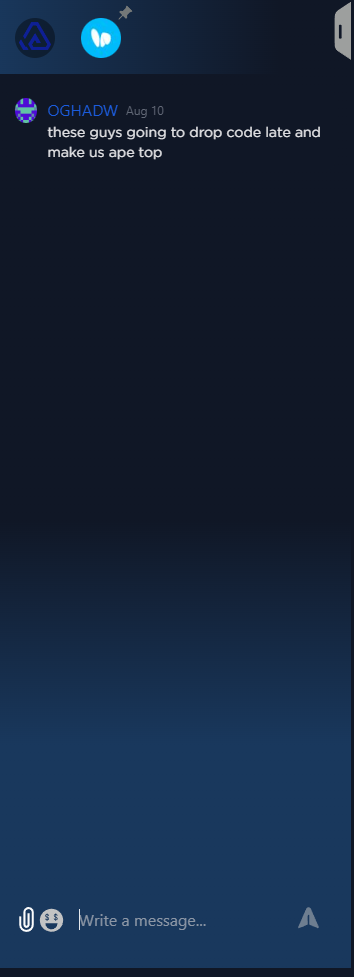
Every Alphagate subscriber is automatically added to the "all" group chat, which is prominently displayed at the top of the chat header, marked by the Alphagate logo. When you visit a specific project, a new chat group for that project appears. Here, you can view past discussions, pose questions, and engage in further dialogue.

<figure><img src="https://3883845459-files.gitbook.io/~/files/v0/b/gitbook-x-prod.appspot.com/o/spaces%2FkYOwxgjAF3N544ot4Zcf%2Fuploads%2FPmDNP0FTawUMyfCY28Vi%2FxAt8qgwm6i.png?alt=media&amp;token=857c826d-b27e-4268-a1ed-39a3d6a30cc8" alt="" width="266"><figcaption></figcaption></figure>

By default, when you navigate away from a project page, its associated chat group disappears, and you exit the chat. However, if you wish to remain connected to a project's chat, you can pin it. Simply click on the pin icon next to the project icon. Once pinned, the chat remains accessible, and you'll receive notifications for new messages in that group.

<figure><img src="https://3883845459-files.gitbook.io/~/files/v0/b/gitbook-x-prod.appspot.com/o/spaces%2FkYOwxgjAF3N544ot4Zcf%2Fuploads%2FdHk6JUubLQCMic36cBDl%2FJDDRQ0Asij.png?alt=media&amp;token=d1bb35bb-c127-4f13-ba05-f8a049614fcf" alt=""><figcaption></figcaption></figure>

<figure><img src="https://3883845459-files.gitbook.io/~/files/v0/b/gitbook-x-prod.appspot.com/o/spaces%2FkYOwxgjAF3N544ot4Zcf%2Fuploads%2Fiu4FaLKAe14tRxOB1wHJ%2Fchrome_4vmLGncAVC.png?alt=media&amp;token=dac74cfc-199d-4f24-b2ef-046dfd9edd15" alt=""><figcaption></figcaption></figure>

**Tip:** Within chat messages, typing @project\_name generates a clickable link that directs users to the mentioned project. This feature streamlines discussions, guiding them to the relevant project's chat.


# Referrals

Our Referral Program offers users the opportunity to earn a commission by referring new users to our services. Below are the key features of the program:

1. **Commission Structure:** \
   As a referrer, you are entitled to a 15% commission of the subscription fee for each new user who subscribes to our service through your referral link. If a user you referred subscribes for additional months, **you continue to earn** a 15% commission **each month** for as long as they remain a paying subscriber.
2. **Payout Method:** \
   The commission is paid out in cryptocurrency and can be claimed at your convenience.
3. **Tracking Referrals:** \
   You have the ability to track your referrals in real-time, including the number of people you have referred and how many have taken up a subscription.


# Discord Role

To join our private [**Discord**](https://discord.gg/alphagate) chat and get the Subscriber role, just connect your Discord in your [account settings](/overview/our-features).

{% hint style="info" %}
(We only request to see your Discord ID so we can authenticate you)
{% endhint %}

&#x20;                                                                 ![](https://3883845459-files.gitbook.io/~/files/v0/b/gitbook-x-prod.appspot.com/o/spaces%2FkYOwxgjAF3N544ot4Zcf%2Fuploads%2Fu5JUk2sSfwds7M6VkGXM%2Fimage.png?alt=media\&token=fad428b8-0ff6-4139-99fd-dc6532cef5dc)<br>